Earlier chapters summarized one variable at a time. We now study two variables together. This chapter builds the two basic ways to summarize them: the joint distribution, which records how often each combination of values occurs, and the conditional distribution, which records the distribution of one variable within fixed values of the other. We do each for discrete data and then for continuous data, and close with Simpson’s paradox, where a relationship that holds inside every subgroup reverses once the subgroups are pooled. Throughout, the data for each observation are grouped together as a vector \((\hat{X}_{i}, \hat{Y}_{i})\).
Code
# USArrests has 50 rows (one per US state) and four crime columns;
# pick two of those columns to form a bivariate dataset.
xy <- USArrests[, c('Murder', 'UrbanPop')]
xy[1, ]                                # first state's two values
##         Murder UrbanPop
## Alabama   13.2       58
Joint Distributions
Discrete Data.
When two variables are recorded together for each observation, the first question is how often each combination of values appears.
The joint distribution of two discrete variables \(X_{i}\) and \(Y_{i}\) is the table giving the share of observations with \(X_{i}=x\) and \(Y_{i}=y\), for every combination of values \((x,y)\): \[\hat{p}_{xy} = \sum_{i=1}^{n}\mathbf{1}\left( \hat{X}_{i}=x, \hat{Y}_{i}=y \right)/n,\] where \(\mathbf{1}(\cdot)\) is an indicator function that equals \(1\) if the expression inside is TRUE and \(0\) otherwise.
The joint distribution is also called a frequency table (or cross-tabulation) and is useful for summarizing how two categorical variables co-occur: it is the starting point for every other two-variable statistic in this chapter. Dividing the count by \(n\) puts the cells on a probability scale, so each cell reports a proportion of the sample and the whole table sums to one.
Sometimes we only need to summarize one of the two variables and ignore the other.
The marginal distribution of \(X_{i}\) is the univariate distribution obtained by summing the joint distribution over all values of \(Y_{i}\): \[\hat{p}_{x} = \sum_{y} \hat{p}_{xy}.\]
The marginal (so called because it lives in the row and column margins of the joint table) is useful for recovering the univariate picture once the joint table is built, and for supplying the base rates (\(\hat{p}_{x}\), \(\hat{p}_{y}\)) that conditional distributions divide by. The same numbers can also be computed directly from the univariate data without ever forming the joint table (see here).
For example, suppose we observe a sample of \(n=13\) students with two discrete variables:
- \(X_{i}\) depicts years of education, taking values in \(\{12, 14\}\)
- \(Y_{i}\) depicts sex, where \(y=1\) means female and \(y=0\) means male
Assume the count data are summarized by the following table:
\[\begin{array}{c|cc|c}
& y=0\ (\text{male}) & y=1\ (\text{female})\\
\hline
x=12 & 4 & 3 \\
x=14 & 1 & 5 \\
\hline
\end{array}\]
The joint distributions divides each cell count by the total number of observations to obtain
\[\begin{array}{c|cc}
& y=0 & y=1\\
\hline
x=12 & 4/13 & 3/13 \\
x=14 & 1/13 & 5/13
\end{array}\]
The marginal distribution of \(X_{i}\) is \[\begin{eqnarray}
\hat{p}_{x=12} &=& \frac{4}{13} + \frac{3}{13} = \frac{7}{13},\\
\hat{p}_{x=14} &=& \frac{1}{13} + \frac{5}{13} = \frac{6}{13}.
\end{eqnarray}\] The marginal distribution of \(Y_{i}\) is \[\begin{eqnarray}
\hat{p}_{y=0} &=& \frac{4}{13} + \frac{1}{13} = \frac{5}{13} \approx 0.38,\\
\hat{p}_{y=1} &=& \frac{3}{13} + \frac{5}{13} = \frac{8}{13} \approx 0.62.
\end{eqnarray}\]
Together, this yields a frequency table with marginals
\[\begin{array}{c|cc|c}
& y=0\ (\text{male}) & y=1\ (\text{female}) & \text{Row total}\\
\hline
x=12 & 4/13 & 3/13 & 7/13\\
x=14 & 1/13 & 5/13 & 6/13\\
\hline
\text{Column total} & 5/13 & 8/13 & 1
\end{array}\]
Code
# Simple hand-built dataset: 13 students, two variables each
dat <- rbind(
    c(12, 0), c(12, 0), c(12, 0), c(12, 0), # 4 male with 12 years
    c(14, 0),                                # 1 male with 14 years
    c(12, 1), c(12, 1), c(12, 1),            # 3 female with 12 years
    c(14, 1), c(14, 1), c(14, 1), c(14, 1), c(14, 1)) # 5 female with 14 years
colnames(dat) <- c('educ', 'female')
dat <- as.data.frame(dat)

# Frequency table and joint distribution
tab  <- table(dat)          # raw counts: rows=educ, cols=female
prop <- tab / sum(tab)      # joint distribution p_xy (sums to 1)

# addmargins() appends row and column totals (i.e., the marginals)
prop_m <- addmargins(prop)
round(prop_m, 2)
##      female
## educ     0    1  Sum
##   12  0.31 0.23 0.54
##   14  0.08 0.38 0.46
##   Sum 0.38 0.62 1.00
Note that you can compute various univariate statistics using the marginal distributions. E.g., the mean of \(\hat{X}_{i}\) is \(\hat{M}_{X}=\sum_{x} x \hat{p}_{x}\). In the the above example, that equals \(12 \frac{7}{13} + 14\frac{6}{13} \approx 12.9\). Try computing the standard deviation \(\hat{S}_{X}\) yourself.
Code
# marginals and univariate statistics
p_x <- margin.table(prop, 1)
sum(p_x* as.numeric(names(p_x)) )
## [1] 12.92308
mean(dat[, 1])
## [1] 12.92308

# p_y <- margin.table(prop, 2)
Summarize the distribution of sex and education attainment for highschool students
Code
library(Ecdat)

# Highschool Students, Sex and Education Attainment
dat <- Wages1[, c('school', 'sex')]
dat <- dat[ dat[, 'school'] >=10, ]
Try it yourself before looking at this answer
Code
tab <- table(dat) ## counts
tab
##       sex
## school female male
##     10    166  233
##     11    307  354
##     12    594  594
##     13    189  150
##     14    140  124
##     15     68   66
##     16     11    5

prop <- tab/sum(tab) ## frequencies
round(prop, 3)
##       sex
## school female  male
##     10  0.055 0.078
##     11  0.102 0.118
##     12  0.198 0.198
##     13  0.063 0.050
##     14  0.047 0.041
##     15  0.023 0.022
##     16  0.004 0.002

prop_full <- addmargins(prop) ## column and row sums
round(prop_full, 3)
##       sex
## school female  male   Sum
##    10   0.055 0.078 0.133
##    11   0.102 0.118 0.220
##    12   0.198 0.198 0.396
##    13   0.063 0.050 0.113
##    14   0.047 0.041 0.088
##    15   0.023 0.022 0.045
##    16   0.004 0.002 0.005
##    Sum  0.492 0.508 1.000
Continuous Data.
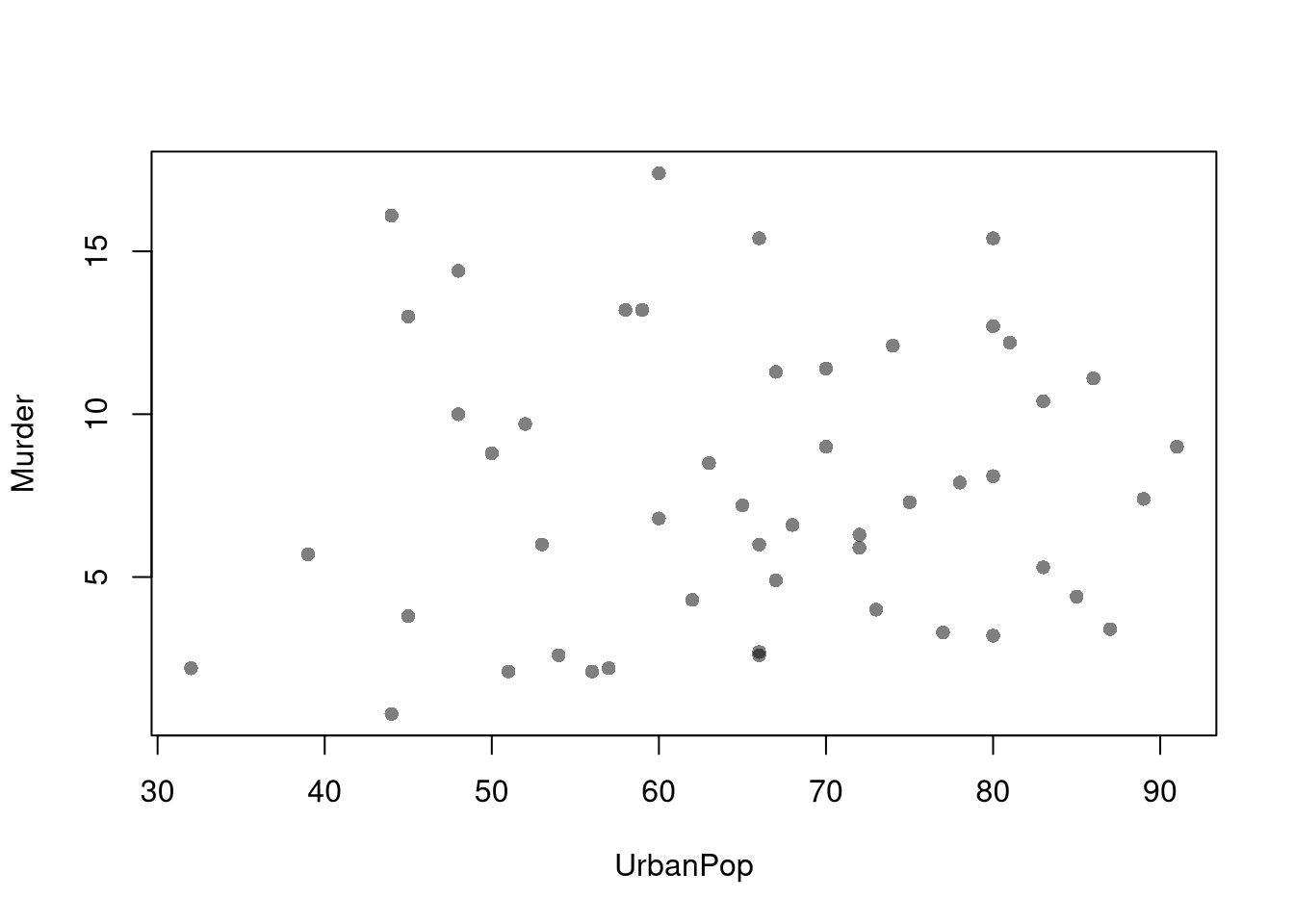
Scatterplots are used frequently to summarizes the joint distribution of continuous data. They can be enhanced in several ways. As a default, use semi-transparent points so as not to hide any points (and perhaps see if your observations are concentrated anywhere). You can also add other features that help summarize the relationship, although I will defer this until later.
Code
plot(Murder ~ UrbanPop, USArrests, pch=16, col=grey(0, .5),
    main=NA, xlab='Urban Population', ylab='Murder Arrests')
You can also show the marginal distributions of each variable along each axis (see this margin and layout cheatsheet for how layout(), mar, and oma work together).
Code
# Setup Plot
layout( matrix(c(2, 0, 1, 3), ncol=2, byrow=TRUE),
    widths=c(9/10, 1/10), heights=c(1/10, 9/10))

# Scatterplot
par(mar=c(4, 4, 1, 1))
plot(Murder ~ UrbanPop, USArrests, pch=16, col=grey(0, .5),
    main=NA, xlab='Urban Population', ylab='Murder Arrests')

# Add Marginals
par(mar=c(0, 4, 1, 1))
xhist <- hist(USArrests[, 'UrbanPop'], plot=FALSE)
barplot(xhist[['counts']], axes=FALSE, space=0, border=NA)

par(mar=c(4, 0, 1, 1))
yhist <- hist(USArrests[, 'Murder'], plot=FALSE)
barplot(yhist[['counts']], axes=FALSE, space=0, horiz=TRUE, border=NA)
Conditional Distributions
Discrete Data.
Often we want to know how the distribution of one variable changes when we restrict attention to a subgroup defined by another.
The conditional distribution of \(Y_{i}\) given \(X_{i}=x\) is the joint share renormalized so the row at \(X_{i}=x\) sums to one: \[\hat{p}_{y \mid x} = \frac{\hat{p}_{xy}}{\hat{p}_{x}},\] where \(\hat{p}_{x} = \sum_y \hat{p}_{xy}\) is the marginal of \(X_{i}\).
Conditional distributions are useful when one variable splits the data into meaningful subgroups (sex, education level, treatment status) and we want to compare the outcome distribution across those subgroups. The renormalization is what changes the unit of analysis: row sums equal to one means each row is itself a probability distribution over \(y\) for the given \(x\), rather than a share of the whole sample. Swapping which variable is in the denominator gives the other direction, \(\hat{p}_{x\mid y}=\hat{p}_{xy}/\hat{p}_{y}\), which generally answers a different question.
For example, suppose we observe a sample of \(n=13\) students with two discrete variables:
- \(X_{i}\) depicts years of education, taking values in \(\{12, 14\}\)
- \(Y_{i}\) depicts sex, where \(y=1\) means female and \(y=0\) means male
Assume the data are summarized by the following joint distribution table:
\[\begin{array}{c|cc|c}
& y=0\ (\text{male}) & y=1\ (\text{female}) & \text{Row total}\\
\hline
x=12 & 4/13 & 3/13 & 7/13\\
x=14 & 1/13 & 5/13 & 6/13\\
\hline
\text{Column total} & 5/13 & 8/13 & 1
\end{array}\]
To compute the conditional distribution of \(Y_{i}\) given \(X_{i}=x\), we rescale the numbers in each row so that each row sums to 1. Specifically, for \(x=12\), we compute \[\begin{eqnarray}
\hat{p}_{y=0 \mid x=12}
&=& \frac{\hat{p}_{x=12, y=0}}{\hat{p}_{x=12}}
= \frac{4/13}{7/13}
= \frac{4}{7} \\
\hat{p}_{y=1\mid x=12}
&=& \frac{\hat p_{x=12, y=1}}{\hat{p}_{x=12}}
= \frac{3/13}{7/13}
= \frac{3}{7}
\end{eqnarray}\] Similarly, for \(x=14\), we compute \[\begin{eqnarray}
\hat{p}_{y=0 \mid x=14}
&=& \frac{\hat{p}_{x=14, y=0}}{\hat{p}_{x=14}}
= \frac{1/13}{6/13}
= \frac{1}{6}. \\
\hat{p}_{y=1\mid x=14}
&=& \frac{\hat p_{x=14, y=1}}{\hat{p}_{x=14}}
= \frac{5/13}{6/13}
= \frac{5}{6}.
\end{eqnarray}\] Together, we find
\[\begin{array}{c|cc|c}
& y=0\ (\text{male}) & y=1\ (\text{female}) & \text{Row total}\\
\hline
x=12 & 4/7 & 3/7 & 7/7\\
x=14 & 1/6 & 5/6 & 6/6\\
\hline
\end{array}\]
In this example, we say that
- conditional on students having \(12\) years of education, \(\frac{4}{7}\approx 57\%\) are male and \(\frac{3}{7}\approx 43\%\) are female.
- conditional on students having \(14\) years of education, \(\frac{1}{6} \approx 17\%\) are male and \(\frac{5}{6} \approx 83\%\) are female.
We can also compute the conditional distribution of \(X_{i}\) given \(Y_{i}=y\), \(\hat{p}_{x \mid y} = \hat{p}_{xy} / \hat{p}_{y}\),just as we did above. In this case, we rescale the numbers in each column of the joint distribution table so that each column sums to 1.
Continuing the example above, show that
- among male students, \(\approx 80\%\) have 12 years of education.
- among female students, \(\approx 38\%\) have 12 years of education.
Try programming the results, especially if you are stuck or uncertain
Code
dat <- rbind(
    c(12, 0), c(12, 0), c(12, 0), c(12, 0), #Male
    c(14, 0),
    c(12, 1), c(12, 1), c(12, 1),
    c(14, 1), c(14, 1), c(14, 1), c(14, 1), c(14, 1))
colnames(dat) <- c('educ', 'female')
dat <- as.data.frame(dat)

tab <- table(dat)
tab
##     female
## educ 0 1
##   12 4 3
##   14 1 5

# Joint distribution
round(prop.table(tab), 3)
##     female
## educ     0     1
##   12 0.308 0.231
##   14 0.077 0.385

# Conditional distribution of Y given X
round(prop.table(tab, 1), 3)
##     female
## educ     0     1
##   12 0.571 0.429
##   14 0.167 0.833

# Conditional distribution of X given Y
round(prop.table(tab, 2), 3)
##     female
## educ     0     1
##   12 0.800 0.375
##   14 0.200 0.625
Conditional distributions change the unit of analysis:
- \(\hat{p}_{y=1 \mid x=14}\) answers “what fraction of students are female within the subgroup with 14 years of education?”
- \(\hat{p}_{x=14 \mid y=1}\) answers “what fraction of students have 14 years of education within the subgroup that is female?”
The two directions answer different questions, and confusing them is so common that the mistake has its own name.
The base-rate fallacy is the mistake of confusing \(\hat{p}_{y\mid x}\) with \(\hat{p}_{x\mid y}\) (reading the wrong conditional) and forgetting how common \(X_{i}=x\) is in the first place (\(\hat{p}_{x}\), the base rate).
The base-rate fallacy is useful to flag whenever a headline reports a conditional probability without saying which direction. A rare category can produce a low rate per case yet still dominate raw counts, and a common category can dominate raw counts even when its rate per case is low. The “most-stolen car” example below illustrates exactly this pattern.
The most-stolen car. Suppose you read that the Honda Civic is the most-stolen car in a city. Does that mean a Civic is more likely to be stolen than other cars? Not necessarily.
Imagine a city with \(100{,}000\) cars: \(70{,}000\) Civics and \(30{,}000\) of other models. Let \(X_{i}\) be the model and \(Y_{i}\) whether car \(i\) was stolen. The counts are
\[\begin{array}{c|cc|c}
& \text{not stolen} & \text{stolen} & \text{Row total}\\
\hline
\text{Civic} & 69300 & 700 & 70000\\
\text{other} & 29460 & 540 & 30000\\
\hline
\text{Column total} & 98760 & 1240 & 100000
\end{array}\]
More Civics are stolen than other cars (\(700 > 540\)), so the Civic is the “most-stolen” model. But the conditional distributions tell two different stories:
- \(\hat{p}_{\text{stolen}\mid\text{Civic}} = \frac{700}{70000} = 0.010\) is the theft rate for a Civic.
- \(\hat{p}_{\text{stolen}\mid\text{other}} = \frac{540}{30000} = 0.018\) is the theft rate for other cars.
- \(\hat{p}_{\text{Civic}\mid\text{stolen}} = \frac{700}{1240} \approx 0.565\) is the share of stolen cars that are Civics.
A Civic is less likely to be stolen (\(1.0\%\) vs \(1.8\%\)), yet most stolen cars are Civics. The reason is the base rate: \(\hat{p}_{\text{Civic}} = 0.70\) of all cars are Civics. “Most-stolen” is a statement about \(\hat{p}_{x\mid y}\) (the model given theft), while car-theft risk is a statement about \(\hat{p}_{y\mid x}\) (theft given the model).
Code
# Count table: rows = model, columns = stolen
counts <- rbind(
    Civic = c(not=69300, stolen=700),
    other = c(not=29460, stolen=540))

# Theft rate by model: p(stolen | model)
counts[, 'stolen'] / rowSums(counts)
## Civic other
## 0.010 0.018

# Share of stolen cars by model: p(model | stolen)
counts[, 'stolen'] / sum(counts[, 'stolen'])
##     Civic     other
## 0.5645161 0.4354839
Continuous Data.
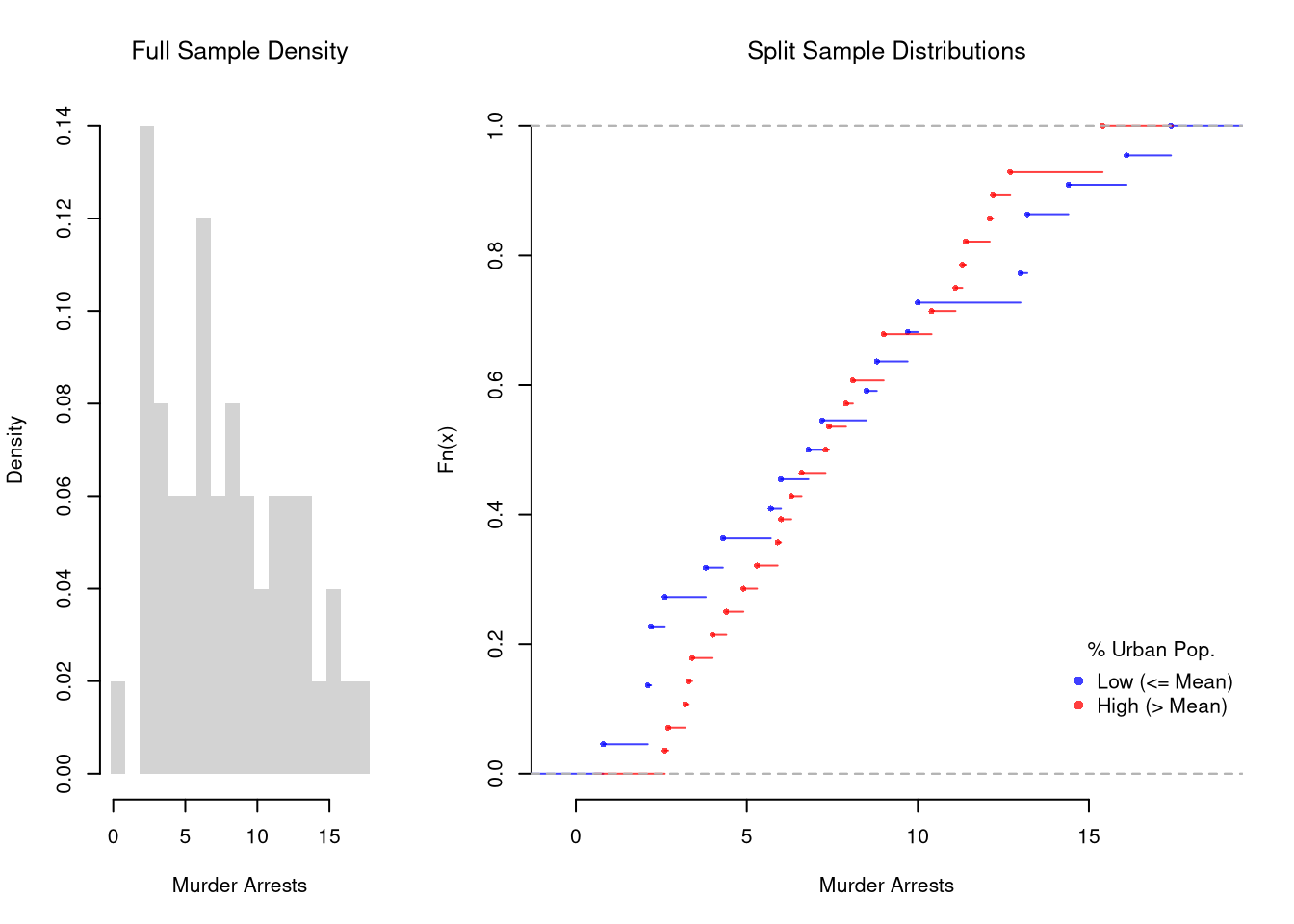
These describe the relationship between \(\hat{Y}_{i}\) and \(\hat{X}_{i}\). We show how \(Y\) changes according to \(X\) using a histogram or bar plot. When \(X\) is continuous, as it often is, we split it into distinct bins and convert it to a factor variable. E.g.,
Code
# Split Data by Urban Population above/below mean
pop_mean <- mean(USArrests[, 'UrbanPop'])
pop_cut <- USArrests[, 'UrbanPop'] <= pop_mean
murder_lowpop <- USArrests[pop_cut, 'Murder']
murder_highpop <- USArrests[!pop_cut, 'Murder']
cols <- c(low=rgb(0, 0, 1, .75), high=rgb(1, 0, 0, .75))

# Common Histogram
ylim <- c(0, .25)
xbks <-  seq(min(USArrests[, 'Murder'])-1, max(USArrests[, 'Murder'])+1, by=1)

par(mfrow=c(1, 2))
hist(murder_lowpop,
    breaks=xbks, col=cols[1],
    main=NA,
    xlab='Murder Arrests', freq=FALSE,
    border=NA, ylim=ylim)
title('Urban Pop <= Mean', font.main=1)

hist(murder_highpop,
    breaks=xbks, col=cols[2],
    main=NA,
    xlab='Murder Arrests', freq=FALSE,
    border=NA, ylim=ylim)
title('Urban Pop > Mean', font.main=1)
It is sometimes preferable to show the ECDF instead. And you can glue various combinations together to convey more information all at once
Code
layout( t(c(1, 2, 2)))
# Full Sample Density
hist(USArrests[, 'Murder'],
    main=NA,
    xlab='Murder Arrests',
    breaks=xbks, freq=FALSE, border=NA)
title('Full Sample Density', font.main=1)

# Split Sample Distribution Comparison
F_lowpop <- ecdf(murder_lowpop)
plot(F_lowpop, col=cols[1],
    pch=16, xlab='Murder Arrests',
    main=NA, bty='n')
title('Split Sample Distributions', font.main=1)
F_highpop <- ecdf(murder_highpop)
plot(F_highpop, add=TRUE, col=cols[2], pch=16)

legend('bottomright', col=cols,
    pch=16, bty='n', inset=c(0, .1),
    title='% Urban Pop.',
    legend=c('Low (<= Mean)', 'High (> Mean)'))
Code
# Simple Interactive Scatter Plot
# plot(Assault ~ UrbanPop, USArrests, col=grey(0, .5), pch=16,
#    cex=USArrests[, 'Murder']/diff(range(USArrests[, 'Murder']))*2,
#    main='US Murder arrests (per 100, 000)')
You can also split data into more than two groups. For more than three groups, boxplots are often more effective than histograms or ECDF’s.
Code
# K Groups with even spacing (not even counts)
K <- 4
USArrests[, 'UrbanPop_Kcut'] <- cut(USArrests[, 'UrbanPop'], K)
table(USArrests[, 'UrbanPop_Kcut'] )
##
## (31.9,46.8] (46.8,61.5] (61.5,76.2] (76.2,91.1]
##           6          13          17          14

# Full sample
#boxplot(USArrests[, 'Murder'], main='',
#    xlab='All Data', ylab='Murder Arrests')

# Boxplots for each group
Kcols <- hcl.colors(K, alpha=.5)
boxplot(Murder ~ UrbanPop_Kcut, USArrests,
    main=NA, col=Kcols,
    whisklty=0, staplelty=0, outline=FALSE,
    varwidth=TRUE, #show number of obs. per group
    xlab='Urban Population', ylab='Murder Arrests')
Code
# 4 Groups with equal numbers of observations
#Qcuts <- c(
#    '0%'=min(USArrests[, 'UrbanPop'])-10*.Machine[['double.eps']],
#    quantile(USArrests[, 'UrbanPop'], probs=c(.25, .5, .75, 1)))
#USArrests[, 'UrbanPop_cut'] <- cut(USArrests[, 'UrbanPop'], Qcuts)
#boxplot(Murder ~ UrbanPop_cut, USArrests, col=hcl.colors(4, alpha=.5))
Simpson’s Paradox
A relationship visible inside every subgroup can flip direction once those subgroups are pooled.
Simpson’s paradox arises when a relationship that holds inside every subgroup reverses when the data are pooled. The within-group conditional distributions \(\hat{p}_{y\mid x, g}\) point one way; the overall \(\hat{p}_{y\mid x}\) points the other.
Simpson’s paradox is useful as a warning whenever you are tempted to pool subgroups: the pooled relationship reflects both the within-group pattern and how the subgroups differ in size. The classic example involves university admissions, where \(400\) men and \(400\) women apply to one of two departments (English or Engineering). Women can have higher admission rates within both departments yet a lower overall admission rate, if women disproportionately apply to the more selective department (English) and men to the less selective one (Engineering). The example is part of a real debate about discrimination (http://homepage.stat.uiowa.edu/~mbognar/1030/Bickel-Berkeley.pdf) and the same logic applies to the gender pay gap, cross-country growth comparisons, and many other social issues.
School Applicants (Admitted), by Sex and Department
| English |
100 (40, \(40\%\)) |
350 (150, \(43\%\)) |
450 (190, \(42\%\)) |
| Engineering |
300 (160, \(53\%\)) |
50 (30, \(60\%\)) |
350 (190, \(54\%\)) |
| Total |
400 (200, \(50\%\)) |
400 (180, \(45\%\)) |
800 (380, \(48\%\)) |
Explore this issue further with real data
Code
UCBAdmissions
## , , Dept = A
##
##           Gender
## Admit      Male Female
##   Admitted  512     89
##   Rejected  313     19
##
## , , Dept = B
##
##           Gender
## Admit      Male Female
##   Admitted  353     17
##   Rejected  207      8
##
## , , Dept = C
##
##           Gender
## Admit      Male Female
##   Admitted  120    202
##   Rejected  205    391
##
## , , Dept = D
##
##           Gender
## Admit      Male Female
##   Admitted  138    131
##   Rejected  279    244
##
## , , Dept = E
##
##           Gender
## Admit      Male Female
##   Admitted   53     94
##   Rejected  138    299
##
## , , Dept = F
##
##           Gender
## Admit      Male Female
##   Admitted   22     24
##   Rejected  351    317
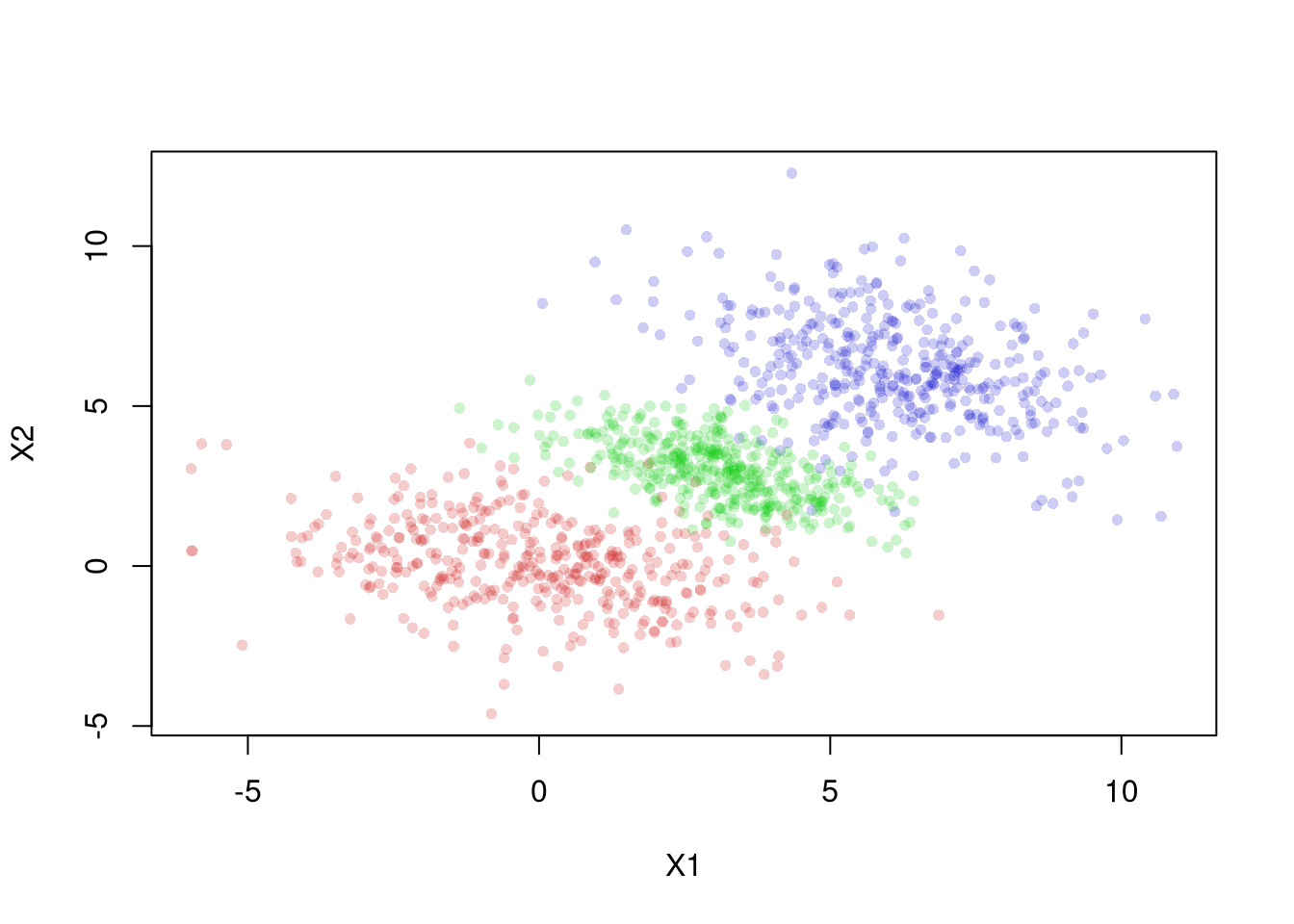
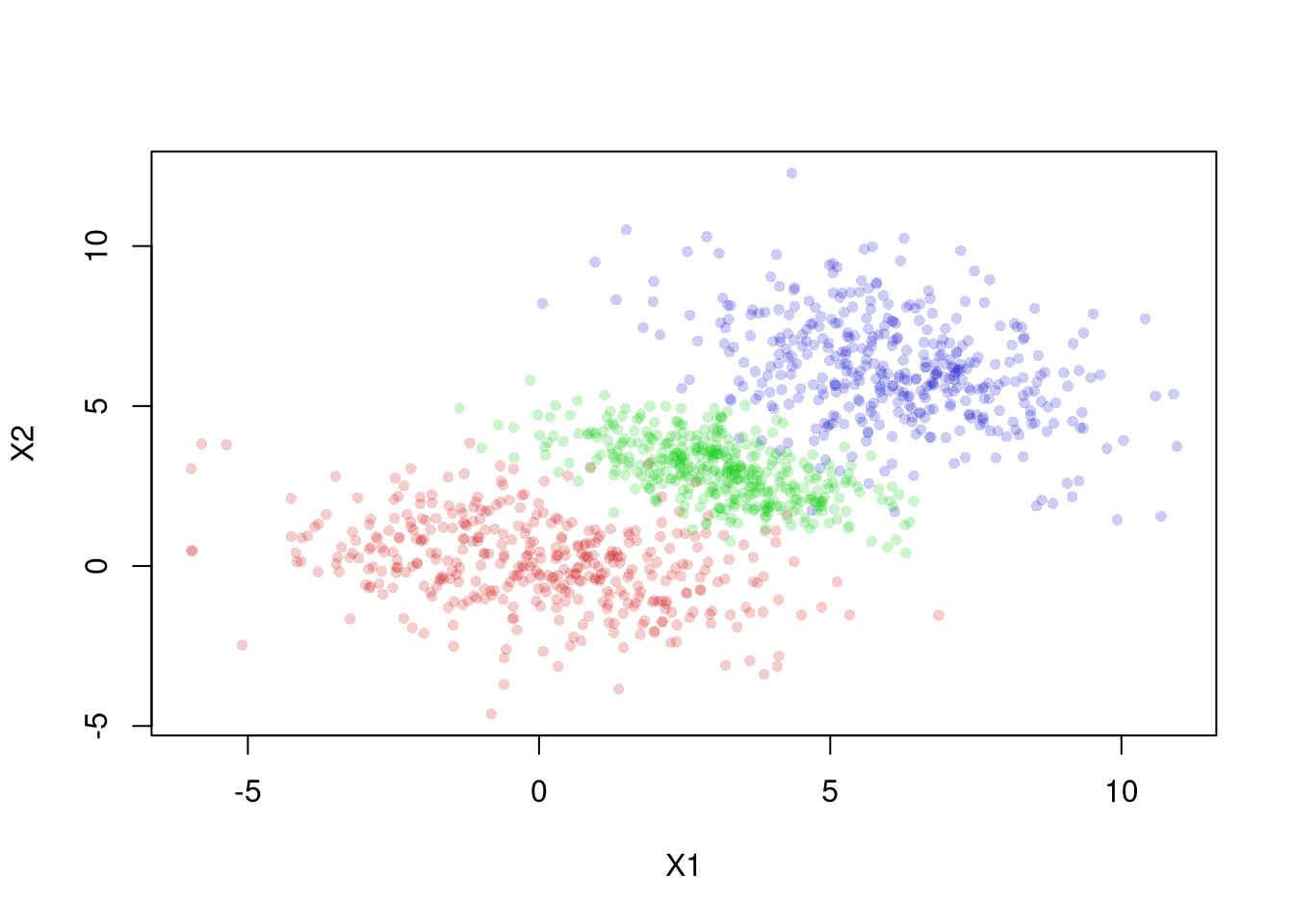
The same issue shows up in continuous data. The figure below shows three groups. Within each group the relationship between \(X1\) and \(X2\) is negative, but the group centers rise together from lower-left to upper-right.
Each within-group regression line (solid) slopes downward, yet the pooled regression line (dashed) slopes upward. A researcher who ignored the groups would report a positive relationship that holds within no single group. Fitting lines like these is the subject of Simple Regression.
Exercises
Comment the script you wrote for this chapter, then restart R and check that it runs from a clean session, then check the script with AI as explained in Working with AI. Write three sentences from memory on the main statistical idea of this chapter, and ask the assistant what is wrong, vague, or missing. Finish with your own questions about whatever you found hardest.
Explain the difference between a joint distribution, a marginal distribution, and a conditional distribution. Using the education-and-sex example from this chapter, describe in words what \(\hat{p}_{y=1 \mid x=14}\) tells you and how it differs from \(\hat{p}_{x=14 \mid y=1}\).
Suppose you observe a sample of \(n=20\) people with two discrete variables: \(X_{i}\) takes values in \(\{A, B\}\) and \(Y_{i}\) takes values in \(\{1, 2\}\). The counts are: \((A,1)=6\), \((A,2)=4\), \((B,1)=3\), \((B,2)=7\). Compute the joint distribution \(\hat{p}_{xy}\), both marginal distributions, and the conditional distribution \(\hat{p}_{y \mid x}\).
Using the USArrests dataset, split the variable Assault into two groups based on whether UrbanPop is above or below its median. Plot overlapping histograms of Assault for both groups with semi-transparent colors. Then plot the ECDF for each group on the same axes with a legend.
Recall
This chapter built up two-variable summaries from joint to marginal to conditional distributions, illustrated with the 13-student education-and-sex table where \(\hat{p}_{y=1\mid x=14}=5/6\) is the share of female students within the 14-years-of-school subgroup. We then saw how confusing the direction of conditioning produces the base-rate fallacy (the “most-stolen car” calculation, where Civics are the most-stolen model but the least likely to be stolen per car), and how Simpson’s paradox can reverse a within-group pattern once the subgroups are pooled. The next chapter conditions on a factor variable to compare two groups directly, and tests the differences with the resampling tools from Part 1.