This chapter models how the average of \(\hat{y}_{i}\) changes with \(\hat{x}_{i}\) without assuming a single straight line. We build up from regressograms (bin averages) to piecewise and local linear regression, carrying one running example throughout: wages and years of schooling.
Local Relationships
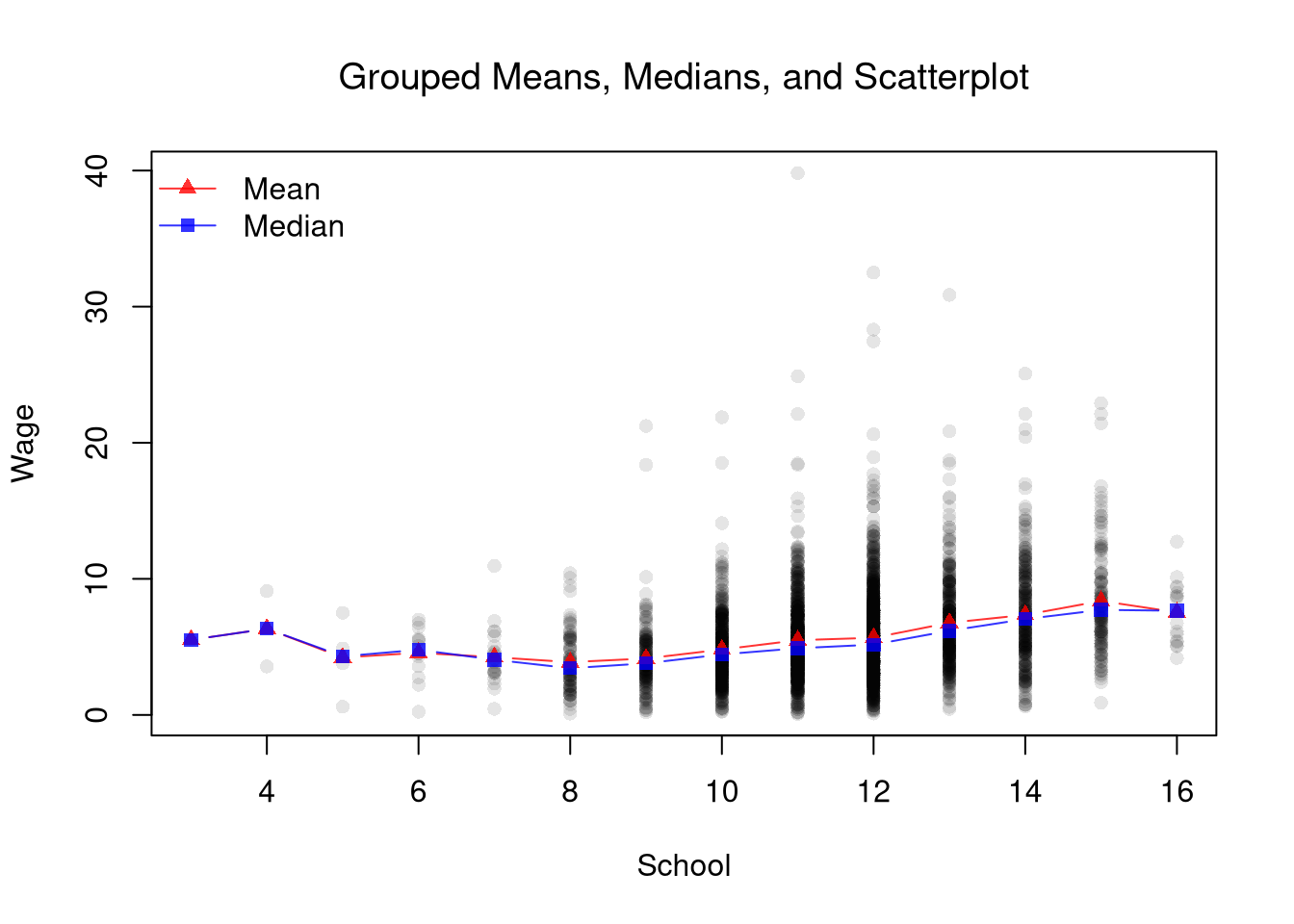
Scatterplots are a great and simplest plot for bivariate data that simply plots each observation. There are many extensions and similar tools. The example below helps understand how both the central tendency and dispersion change.
Code
# Running example for the whole chapter: wages and years of schooling
library(Ecdat)                              # provides Wages1
xy2_hat <- Wages1[order(Wages1[, 'school']), c('school', 'wage')]
colnames(xy2_hat) <- c('x_hat', 'y_hat') # x_hat=years of schooling, y_hat=hourly wage

# Scatter of every observation
plot(y_hat ~ x_hat, data=xy2_hat, pch=16, col=grey(0, .1),
    main=NA, xlab='School', ylab='Wage')

# Conditional mean at each integer schooling level
school_means <- aggregate(y_hat ~ x_hat, data=xy2_hat, mean)
points(y_hat ~ x_hat, data=school_means,    # connect dots so the trend pops
    pch=17, col=rgb(1, 0, 0, .8), type='b')

# Conditional median at each integer schooling level
school_medians <- aggregate(y_hat ~ x_hat, data=xy2_hat, median)
points(y_hat ~ x_hat, data=school_medians,
    pch=15, col=rgb(0, 0, 1, .8), type='b')
legend('topleft', legend=c('Mean', 'Median'),
    pch=c(17, 15), lty=1, col=c(rgb(1, 0, 0, .8), rgb(0, 0, 1, .8)), bty='n')
title('Grouped Means, Medians, and Scatterplot', font.main=1)
Each schooling level is a group, so the red triangles are the conditional means \(\hat{m}_{Y}(g)\) from Comparing Multiple Groups, now ordered along \(\hat{x}\). The blue squares are the grouped medians, the conditional quantile \(\hat{F}_{Y}^{-1}(0.5 \mid x)\) at each schooling level. From 7 to 15 years of schooling, where nearly all the observations lie, each median sits below its mean, a sign that wages within each level are skewed right.
Examine the local relationship between ‘Murder’ and ‘Urbanization’ in the USArrests dataset. Use custom bins.
Code
xy_hat <- USArrests[, c('UrbanPop', 'Murder')]
colnames(xy_hat) <- c('x_hat', 'y_hat') # x_hat=urban population share, y_hat=murder arrests per 100K
bins <- cut(xy_hat[, 'x_hat'], 6)
Regression models offer another way to describe how \(\hat{y}_{i}\) changes with \(\hat{x}_{i}\). A simple linear regression fits one straight line to all of the data, which can miss a relationship that bends. The methods in this chapter instead fit a simple model to the observations within a window of \(\hat{x}_{i}\) values. Each method splits the outcome into two parts, \[
\hat{y}_{i} = \hat{y}_{i}^{\mathrm{fit}} + \hat{e}_{i},
\] where the fitted value \(\hat{y}_{i}^{\mathrm{fit}}\) can bend with \(\hat{x}_{i}\) instead of following a single straight line, and \(\hat{e}_{i}\) is the residual. After minimizing the sum of squared errors in the regressions below, our estimated models will also predict local averages.
The methods differ in two choices: whether the windows are fixed bins or slide along with \(x\), and whether the model within each window is a constant or a line.
| Fixed bins |
Regressogram |
Piecewise regression |
| Window slides with \(x\) |
Locally constant regression |
Locally linear regression |
Each window also needs a width, which controls how “local” a local estimate actually is.
The bandwidth \(h\) is the half-width of a local bin around the design point \(x\): an observation is “local” to \(x\) when \(|\hat{x}_{i}-x|\leq h\).
The bandwidth is useful as the central tuning knob for every local method in this chapter: regressograms, piecewise regression, locally constant kernel regression, and locally linear regression. It is the same \(h\) that set the bin half-width of a histogram and the spread of a kernel density, except that there it controlled how much data went into a density estimate at \(x\), and here it controls how much data goes into a conditional-mean estimate at \(x\). Larger \(h\) pools more observations into each estimate but smooths over real variation; smaller \(h\) tracks the data more closely but uses fewer points per estimate, so the fitted curve becomes noisier.
This chapter writes the grouped means \(\hat{m}_{Y}(g)\) as \(\hat{m}_{Y}(x,h)\), because each group is the set of observations with \(\hat{x}_{i}~\text{in}~[x-h,x+h]\). In the grouped-means figure, \(x\) is a schooling level and \(h=1/2\), so each group holds a single schooling level.
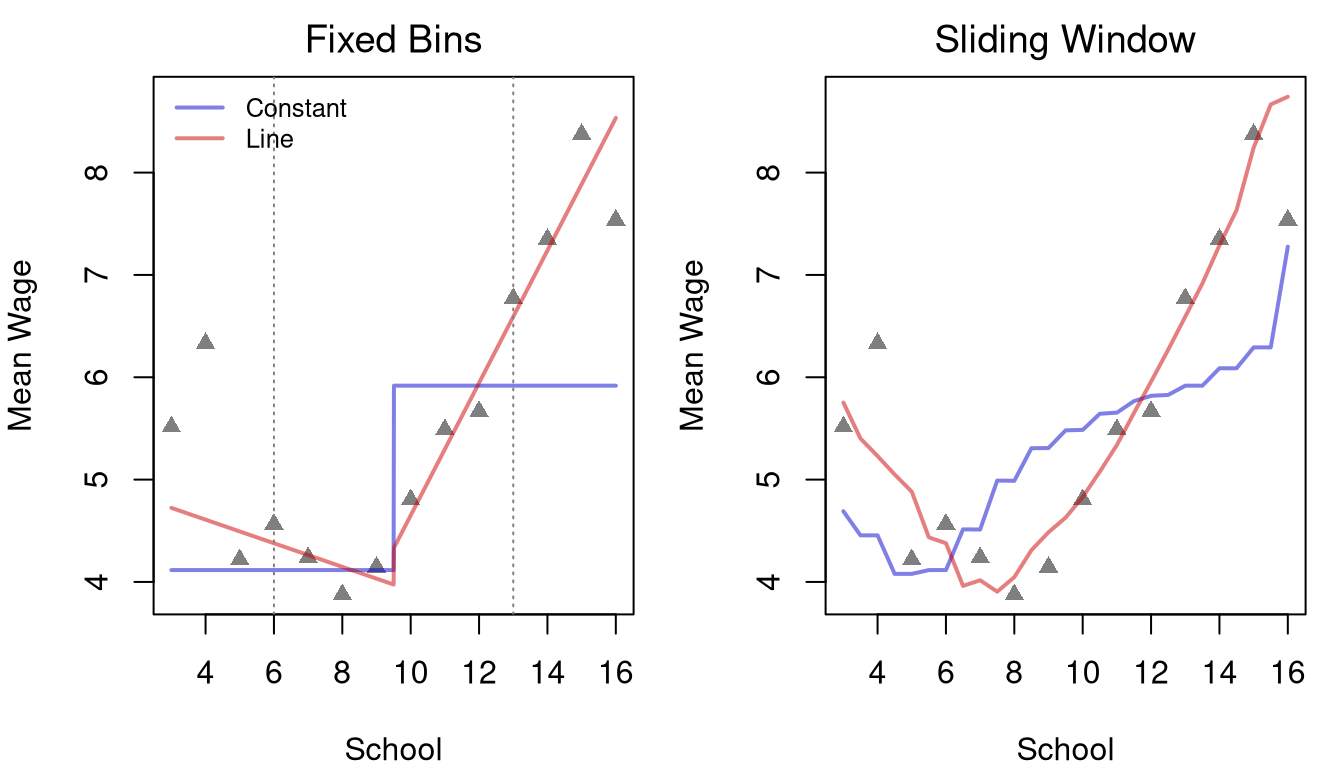
The figure below fits all four methods to the wage data, each with half-width \(h=7/2\). The left panel uses two fixed bins, schooling levels 3 to 9 and 10 to 16, and the right panel slides a window of the same width along \(x\). The grey triangles are the grouped means from the figure above. At the bin midpoints, \(x=6\) and \(x=13\), each window holds exactly one bin, so the sliding fits equal the fixed-bin fits there.
Each step fixes one problem with the step before it. Adding a slope captures the trend within a bin. Sliding the window replaces the jump at the bin edge with smaller steps. Adding a slope to the sliding window reduces bias near the edges of the data. Near the top of the schooling range, for example, the locally constant fit falls below the grouped means, because each window still includes many people with 12 years of schooling, while the locally linear fit follows the trend.
Regressograms
Just as a histogram summarizes how observations are distributed across bins of \(\hat{x}\), a regressogram summarizes how the conditional mean of \(\hat{y}_{i}\) changes across bins of \(\hat{x}\).
A regressogram splits \(\hat{x}\) into exclusive intervals (bins) of half-width \(h\) and reports the average of \(\hat{y}_{i}\) within each bin. With bin midpoints \(x_{1}, ..., x_{L}\), the model is \[\begin{aligned}
\hat{y}_{i} &= \sum_{x~\text{in}~\{x_{1}, ..., x_{L} \}} b_{0}(x,h) \hat{d}_{i}(x,h) + \hat{e}_{i},
\end{aligned}\] where \(\hat{d}_{i}(x,h) = \mathbf{1}\left(\hat{x}_{i}~\text{in}~\left(x-h,x+h\right] \right)\) is a dummy variable for the bin with midpoint \(x\), and each bin has a coefficient \(b_{0}(x,h)\).
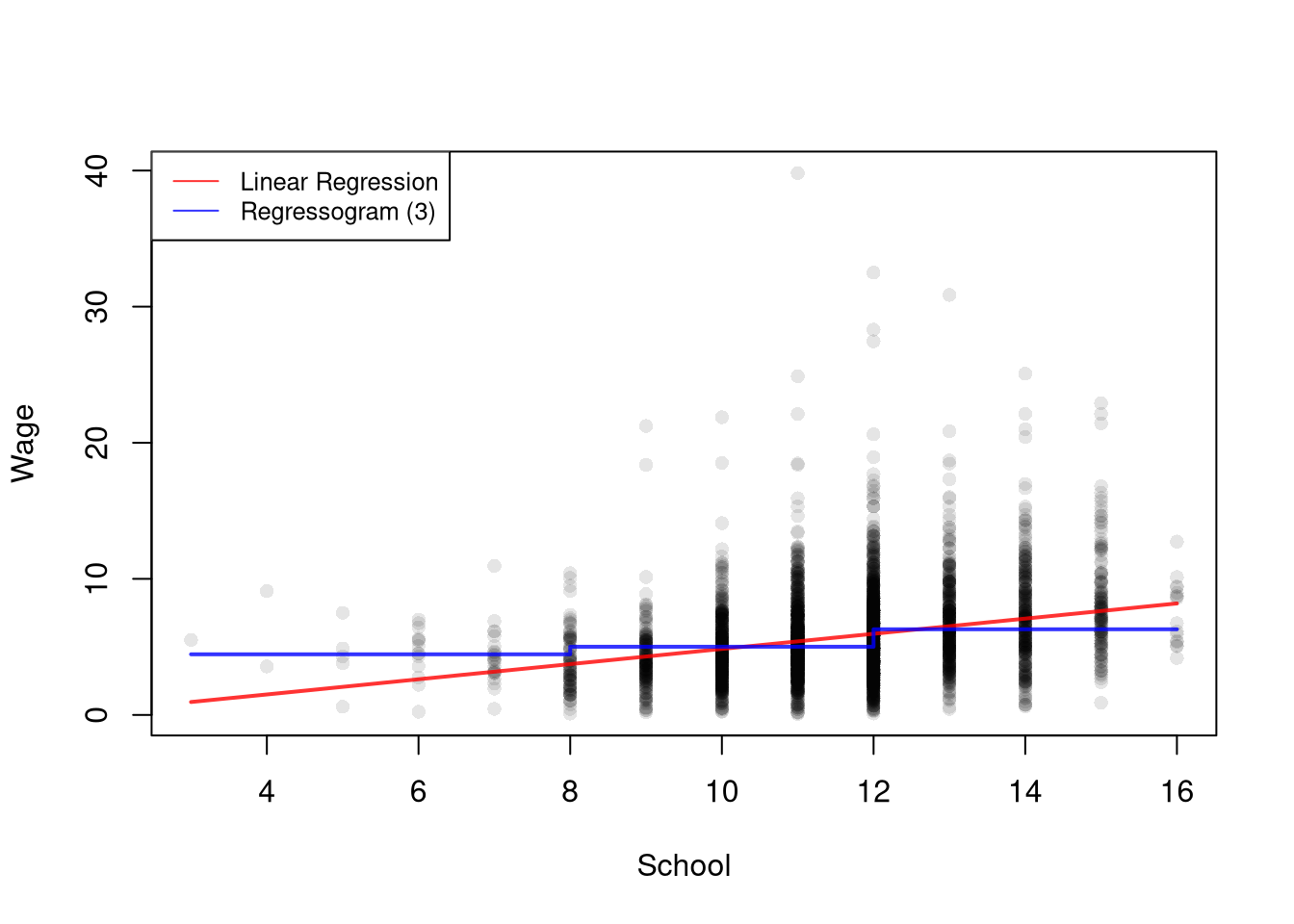
The regressogram is useful when we expect the relationship between \(\hat{x}\) and \(\hat{y}\) to bend in ways a single line cannot capture, because the bin averages can rise, fall, or stay flat from one bin to the next without imposing any global shape. It is the conditional-mean analog of a histogram: histograms count observations within bins of \(\hat{x}\); regressograms average \(\hat{y}\) within bins of \(\hat{x}\).
Code
# Data
plot(y_hat ~ x_hat, data=xy2_hat, pch=16, col=grey(0, .1),
    main=NA, xlab='School', ylab='Wage')
# xy2_hat defined above

## Simple Regression
reg  <- lm(y_hat ~ x_hat, data=xy2_hat) ## OLS

# Regressogram: Two Schooling Bins, levels 3-9 and 10-16
xy2_hat[, 'xcc'] <- cut(xy2_hat[, 'x_hat'], breaks=c(2.5, 9.5, 16.5))
rgram_c  <- lm(y_hat ~ xcc, data=xy2_hat)

# Regressogram: Three Schooling Bins
xy2_hat[, 'xcf']   <- cut(xy2_hat[, 'x_hat'], 3)
rgram_f  <- lm(y_hat ~ xcf, data=xy2_hat)

## Compare Models (Only 2 for simplicity)
lines( xy2_hat[, 'x_hat'], predict(reg), lwd=2, col=rgb(1, 0, 0, .8))
lines( xy2_hat[, 'x_hat'], predict(rgram_f), lwd=2, col=rgb(0, 0, 1, .8), type='s')
legend('topleft',
    legend=c('Linear Regression', 'Regressogram (3)'),
    col=c(rgb(1, 0, 0, .8), rgb(0, 0, 1, .8)),
    lty=1, cex=.8)
In the regressogram model, \(\hat{e}_{i}\) depends on the trial bin coefficients \(b_{0}(x,h)\); the final residuals use the fitted coefficients \(\hat{b}_{0}(x,h)\).
When minimizing the sum of squared errors, the optimal coefficients are denoted as \(\hat{b}_{0}(x,h)\) and we can find them analytically. To do so, notice that each bin has \(n(x,h) = \sum_{i}^{n}\hat{d}_{i}(x,h)\) observations. This means we can split the dataset into parts associated with each bin \[\begin{aligned}
\sum_{i}^{n}\left[\hat{e}_{i}\right]^2
&= \sum_{i}^{n}\left[\hat{y}_{i}- \sum_{x~\text{in}~\{x_{1}, ..., x_{L} \}} b_{0}(x,h) \hat{d}_{i}(x,h) \right]^2 \\
&= \sum_{i}^{n(x_{1},h)}\left[\hat{y}_{i}- \sum_{x~\text{in}~\{x_{1}, ..., x_{L} \}} b_{0}(x,h) \hat{d}_{i}(x,h) \right]^2
+ ... \sum_{i}^{n(x_{L},h)}\left[\hat{y}_{i}- \sum_{x~\text{in}~\{x_{1}, ..., x_{L} \}} b_{0}(x,h) \hat{d}_{i}(x,h) \right]^2 \\
&= \sum_{i}^{n(x_{1},h)}\left[\hat{y}_{i}- b_{0}\left(x_1,h\right) \right]^2 + ... \sum_{i}^{n(x_L,h)}\left[\hat{y}_{i}-b_{0}\left(x_L,h\right) \right]^2 % +~ (N-1)\sum_{i}\hat{y}_{i}.
\end{aligned}\] This separation allows us to analytically optimize for each bin separately \[\begin{aligned}
\min_{ \left\{ b_{0}(x,h) \right\} } \sum_{i}^{n}\left[\hat{e}_{i}\right]^2
&= \min_{ \left\{ b_{0}(x,h) \right\} } \sum_{i}^{n(x,h)}\left[\hat{y}_{i}- b_{0}\left(x,h\right) \right]^2,
\end{aligned}\] Within each bin, this is the simple constant regression applied to the observations in that bin, so minimizing yields the optimal coefficient as follows \[\begin{aligned}
0 &= -2 \sum_{i}^{n(x,h)}\left[ \hat{y}_{i} - b_{0}(x,h) \right] \\
\hat{b}_{0}(x,h) &= \frac{\sum_{i}^{n(x,h)} \hat{y}_{i}}{ n(x,h) } = \hat{m}_{Y}(x,h).
\end{aligned}\] As such, the OLS regression yields coefficients that are interpreted as the conditional mean: \(\hat{m}_{Y}(x,h)\). We can directly compute the same statistic directly by simply taking the average value of \(\hat{y}_{i}\) for all \(i\) observations in a particular bin.
In any case, the values predicted by the model are found as \[
\hat{y}_{i}^{\mathrm{fit}} = \sum_{x} \hat{b}_{0}(x,h) \hat{d}_{i}(x,h) = \sum_{x} \hat{m}_{Y}(x,h) \hat{d}_{i}(x,h).
\] I.e., the predicted value of observation \(i\) is the average value for its bin.
Consider this two-bin regressogram example of how wages differ with schooling for people with \(\leq 9\) years of school completed vs \(> 9\). \[\begin{aligned}
\text{Wage}_{i} &= b_{0}(x=6, h=7/2) \mathbf{1}\left(\text{School}_{i}~\text{in}~(2.5,9.5]\right) + b_{0}(x=13, h=7/2) \mathbf{1}\left(\text{School}_{i}~\text{in}~(9.5,16.5] \right) + \hat{e}_{i}.
\end{aligned}\]
Here is a simple example with three data points \((\hat{x}_{i}, \hat{y}_{i})~\text{in}~\{ (3,2), (4,4), (12,3) \}\), we can easily compute \[\begin{aligned}
n(x=6,h=7/2) &= 2 \\
\hat{b}_{0}(x=6, h=7/2) &= [2 + 4] / 2 \\
n(x=13,h=7/2) &= 1 \\
\hat{b}_{0}(x=13, h=7/2) &= 3 / 1
\end{aligned}\]
Here is a simple example with data
Code
y_fit_c <- predict(rgram_c)
pred_dat <- data.frame(xcc=xy2_hat[, 'xcc'], y_fit=round(y_fit_c, 6))
table(pred_dat)
##             y_fit
## xcc          4.115873 5.917872
##   (2.5,9.5]       293        0
##   (9.5,16.5]        0     3001

## Compare to simple aggregation
aggregate(y_hat ~ xcc, data=xy2_hat, mean)
##          xcc    y_hat
## 1  (2.5,9.5] 4.115873
## 2 (9.5,16.5] 5.917872
Piecewise Regression
To let the slope vary across the range of \(\hat{x}\) instead of just the level, we add a slope term within each bin.
A piecewise regression (also segmented regression) divides \(\hat{x}\) into bins and runs a separate simple linear regression on each bin. The model is \[\begin{aligned}
\hat{y}_{i} &= \sum_{x} \left[b_{0}(x,h) + b_{1}(x,h)\hat{x}_{i} \right] \hat{d}_{i}(x,h) + \hat{e}_{i},
\end{aligned}\] where \(\hat{d}_{i}(x,h)\) is the dummy variable for the bin with midpoint \(x\), and each bin has its own intercept \(b_{0}(x,h)\) and slope \(b_{1}(x,h)\). Within a bin the relationship is a straight line; across bins the slope and intercept can change.
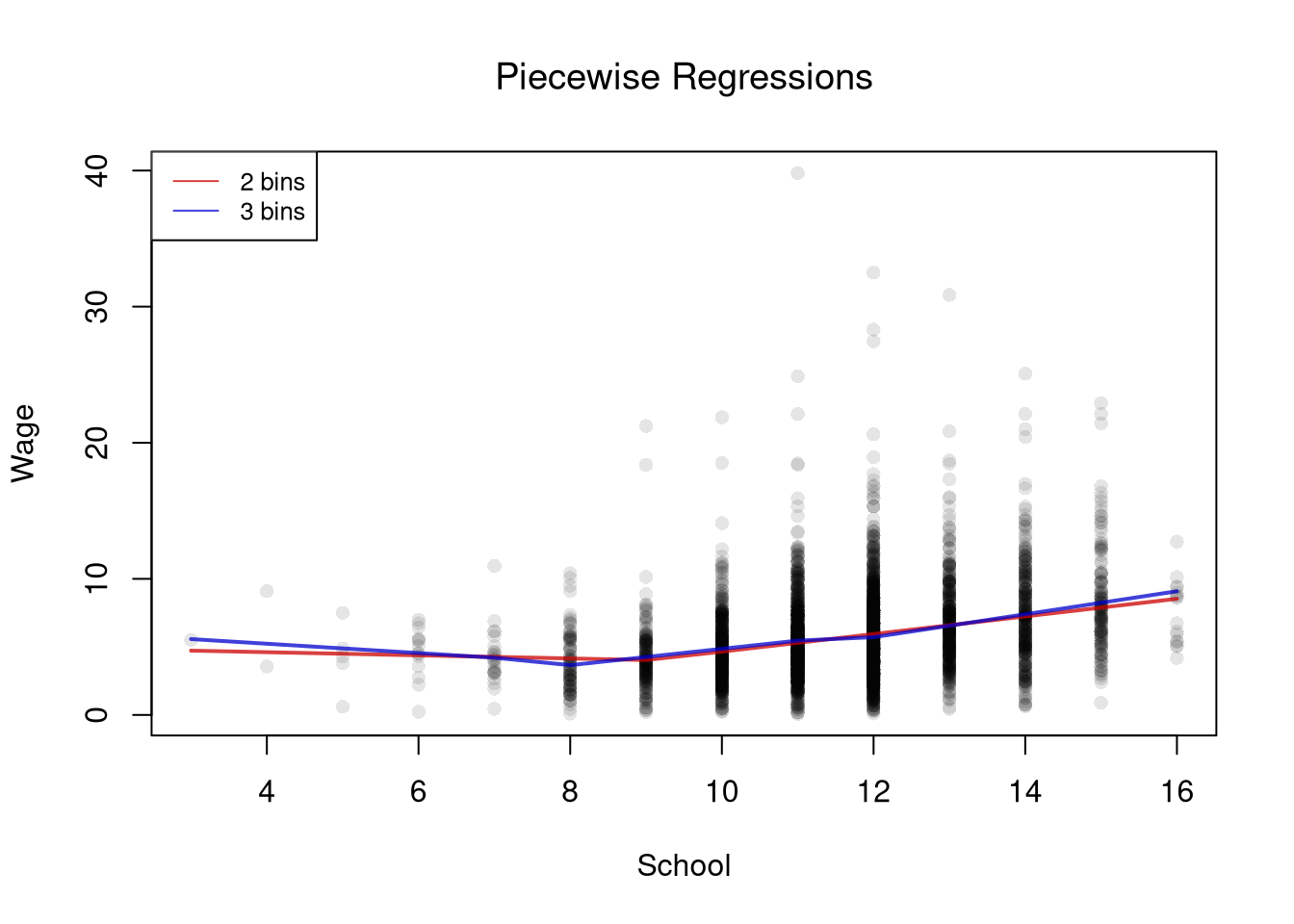
Piecewise regression is useful when the relationship is approximately linear in pieces but the slope itself changes. Returns to schooling might flatten after a degree, for example, or marginal cost curves might kink at capacity. Compared to the regressogram, it captures within-bin trends instead of just within-bin averages; compared to a single line, it lets the slope bend at bin boundaries.
Code
# Data
plot(y_hat ~ x_hat, data=xy2_hat, pch=16, col=grey(0, .1),
    main=NA, xlab='School', ylab='Wage')
# xy2_hat, with the bins xcc and xcf, defined above

# Piecewise: Two Schooling Bins
preg_c  <- lm(y_hat ~ xcc*x_hat, data=xy2_hat)

# Piecewise: Three Schooling Bins
preg_f  <- lm(y_hat ~ xcf*x_hat, data=xy2_hat)

## Compare Models
pw_cols <- c(rgb(.8, 0, 0, .75), rgb(0, 0, .8, .75))
lines( xy2_hat[, 'x_hat'], predict(preg_c), lwd=2, col=pw_cols[1])
lines( xy2_hat[, 'x_hat'], predict(preg_f), lwd=2, col=pw_cols[2])
legend('topleft',
    legend=c('2 bins', '3 bins'),
    lty=1, col=pw_cols, cex=.8)
title('Piecewise Regressions', font.main=1)
This same separation as above allows us to analytically optimize for each bin separately. I.e. we run separate regressions on the split samples. From simple linear regression, we know the solutions are \[\begin{aligned}
\hat{b}_{0}(x,h) &= \hat{m}_{Y}(x,h)-\hat{b}_{1}(x,h)\hat{m}_{X}(x,h) \\
\hat{b}_{1}(x,h) &= \frac{\sum_{i}^{n(x,h)}(\hat{x}_{i}-\hat{m}_{X}(x,h))(\hat{y}_{i}-\hat{m}_{Y}(x,h))}{\sum_{i}^{n(x,h)}(\hat{x}_{i}-\hat{m}_{X}(x,h))^2} = \frac{\hat{c}_{XY}(x,h)}{\hat{v}_{X}(x,h)}.
\end{aligned}\]
Code
# See that two methods give the same predictions
# Piecewise: Two Schooling Bins
xy2_hat[, 'xcc'] <- cut(xy2_hat[, 'x_hat'], breaks=c(2.5, 9.5, 16.5))
preg_c  <- lm(y_hat ~ xcc*x_hat, data=xy2_hat)
y_fit_piecewise <- predict(preg_c)

## Split Sample Regressions
xy2_split_hat <- split( xy2_hat, xy2_hat[, 'xcc'])
y_fit_split <- vector('list', length(xy2_split_hat))
names(y_fit_split) <- names(xy2_split_hat)
for (i in seq_along(xy2_split_hat)) {
    reg2 <- lm(y_hat ~ x_hat, xy2_split_hat[[i]])
    y_fit_split[[i]] <- predict(reg2)
}

# Any differences?
all( abs(y_fit_piecewise - unlist(y_fit_split)) < 1e-10 )
## [1] TRUE
Compare a simple regression to a regressogram and a piecewise regression. Examine the relationship between ‘Murder’ and ‘Urbanization’ in the USArrests dataset.
Code
xy_hat <- USArrests[, c('UrbanPop', 'Murder')]
colnames(xy_hat) <- c('x_hat', 'y_hat') # x_hat=urban population share, y_hat=murder arrests per 100K

# Globally Linear
reg <- lm(y_hat ~ x_hat, data=xy_hat)
Try to do so on your own before looking at the code below, which compares two piecewise regressions to a simple linear regression.
Code
# Diagnose Fit
#plot( fitted(reg), resid(reg), pch=16, col=grey(0, .5))
#plot( xy_hat[, 'x_hat'], resid(reg), pch=16, col=grey(0, .5))

# Linear in 2 Pieces (subsets)
xcut2 <- cut(xy_hat[, 'x_hat'], 2)
xy_list2 <- split(xy_hat, xcut2)
regs2 <- vector('list', length(xy_list2))
names(regs2) <- names(xy_list2)
for (i in seq_along(xy_list2)) {
    regs2[[i]] <- lm(y_hat ~ x_hat, data=xy_list2[[i]])
}

# Linear in 3 Pieces (subsets or bins)
xcut3 <- cut(xy_hat[, 'x_hat'], seq(32, 92, by=20), include.lowest=TRUE) # Finer Bins
xy_list3 <- split(xy_hat, xcut3)
regs3 <- vector('list', length(xy_list3))
names(regs3) <- names(xy_list3)
for (i in seq_along(xy_list3)) {
    regs3[[i]] <- lm(y_hat ~ x_hat, data=xy_list3[[i]])
}

## Make Predictions
pred1 <- data.frame(y_fit=predict(reg),
                    x_hat=reg[['model']][, 'x_hat'])
pred1 <- pred1[order(pred1[, 'x_hat']), ]

pred2 <- vector('list', length(regs2))
for (i in seq_along(regs2)) {
    pred2[[i]] <- data.frame(y_fit=predict(regs2[[i]]),
               x_hat=regs2[[i]][['model']][, 'x_hat'])
}
pred2 <- do.call(rbind, pred2)
pred2 <- pred2[order(pred2[, 'x_hat']), ]

pred3 <- vector('list', length(regs3))
for (i in seq_along(regs3)) {
    pred3[[i]] <- data.frame(y_fit=predict(regs3[[i]]),
               x_hat=regs3[[i]][['model']][, 'x_hat'])
}
pred3 <- do.call(rbind, pred3)
pred3 <- pred3[order(pred3[, 'x_hat']), ]

# Compare Predictions
plot(y_hat ~ x_hat, pch=16, col=grey(0, .5), data=xy_hat)
lines(y_fit ~ x_hat, pred1, lwd=2, col=2)
lines(y_fit ~ x_hat, pred2, lwd=2, col=4)
lines(y_fit ~ x_hat, pred3, lwd=2, col=3)
legend('topleft',
    legend=c('Globally Linear',
             'Piecewise Linear (2)',
             'Piecewise Linear (3)'),
    lty=1, col=c(2, 4, 3), cex=.8)
For many things, a simple linear regression, regressograms, or piecewise regression is “good enough”. Simple linear regressions struggle with nonlinear relationships but are very easy to run with a computer. Regressograms and piecewise regressions are intuitive ways to capture nonlinear relationships that are computationally efficient but have obvious problems where the bins change. Sometimes we want smoother predictions or to estimate derivatives (gradients).
Locally Constant Regression
To avoid the jumps at bin edges, we let the window slide along with \(x\). We first write a bin as a set of regression weights, using the uniform kernel from kernel density estimation, and then move those weights from one design point to the next.
Weighted Regression
Interestingly, we can obtain the piecewise regression estimates from weighted least squares regression. For some specific design point, \(x\), we can find \(\hat{b}_{0}(x,h)\) and \(\hat{b}_{1}(x,h)\) by minimizing \[\begin{aligned}
\sum_{i}^{n}\left[ \hat{e}_{i} \right]^2 \hat{d}_{i}(x,h) &= \sum_{i}^{n}\left[ \hat{y}_{i}- b_{0}(x,h) - b_{1}(x,h) \hat{x}_{i} \right]^2 \hat{d}_{i}(x,h) \\
&= \sum_{i}^{n(x_{1},h)}\left[ \hat{y}_{i}- b_{0}(x_{1},h) - b_{1}(x_{1},h) \hat{x}_{i} \right]^2 \hat{d}_{i}(x_{1},h) + ... \sum_{i}^{n(x_{L},h)}\left[ \hat{y}_{i}- b_{0}(x_{L},h) - b_{1}(x_{L},h) \hat{x}_{i} \right]^2 \hat{d}_{i}(x_{L},h) \\
&= \sum_{i}^{n(x,h)}\left[\hat{y}_{i}- b_{0}\left(x,h\right) - b_{1}(x,h) \hat{x}_{i} \right]^2
\end{aligned}\]
We get nearly identical results if we instead use “uniform weights” with half-width \(h\), \[\begin{aligned}
k_{U}\left( \hat{x}_{i}, x, h \right)
&= \frac{\mathbf{1}\left(\frac{|\hat{x}_{i}-x|}{h} \leq 1\right)}{2}
= \frac{\mathbf{1}\left( \hat{x}_{i}~\text{in}~\left[ x-h, x + h\right] \right) }{2}
\end{aligned}\] which is nearly identical to \(\hat{d}_{i}(x,h)/ 2\), but uses intervals \([]\) instead of \((]\). As such we can see that \[\begin{aligned}
\sum_{i}^{n}\left[ \hat{e}_{i} \right]^2 k_{U}\left( \hat{x}_{i}, x, h \right)
&\approx \sum_{i}^{n}\left[ \hat{e}_{i} \right]^2 \hat{d}_{i}(x,h) / 2 \\
&= \sum_{i}^{n(x,h)}\left[\hat{y}_{i}- b_{0}\left(x,h\right) - b_{1}(x,h) \hat{x}_{i} \right]^2 / 2,
\end{aligned}\] The constant term \(1/2\) is irrelevant to finding the optimal solution (you can check the math yourself).
Here is the weighted regression on the wage data, at the midpoint of the first bin of the two-bin piecewise regression. Both predictions are the same, about \(4.378\).
Code
# xy2_hat and preg_c defined above

## Weighted Regression
x <- 6 # midpoint of the first schooling bin
h <- 3.5 # window [2.5, 9.5] covers schooling levels 3 to 9
k <- abs(xy2_hat[, 'x_hat']-x) /h
k_weights <- dunif(k, -1, 1) # the uniform kernel k_U
preg_k  <- lm(y_hat ~ x_hat, data=xy2_hat, weights=k_weights)
predict(preg_k, newdata=data.frame(x_hat=x))
##        1
## 4.378248

# Compare to Piecewise
predict(preg_c, newdata=data.frame(x_hat=x, xcc='(2.5,9.5]'))
##        1
## 4.378248
Check the same result at a different design point. Use the second bin, (9.5,16.5], which holds schooling levels \(10\) to \(16\).
Code
x <- 13 # midpoint of the second schooling bin
h <- 3.5 # window [9.5, 16.5] covers schooling levels 10 to 16

## Weighted Regression
k_weights <- dunif( abs(xy2_hat[, 'x_hat']-x)/h, -1, 1)
preg_k  <- lm(y_hat ~ x_hat, data=xy2_hat, weights=k_weights)
predict(preg_k, newdata=data.frame(x_hat=x))
##        1
## 6.592354

# Compare to Piecewise
predict(preg_c, newdata=data.frame(x_hat=x, xcc='(9.5,16.5]'))
##        1
## 6.592354
Here is an example going into the details of the weights.
Code
## Generate Sample Data
x0_hat <- 1:5
y0_hat <- round( rnorm(length(x0_hat)) , 2)
y0_hat
## [1] -0.63  0.18 -0.84  1.60  0.33
## plot(x0_hat, y0_hat)

## Manually Compute Estimate at x=3
h <- 1
k3_weights <- dunif( abs(x0_hat-3)/h, -1, 1) #(x0_hat >= 2)*(x0_hat <= 4)
k3_weights
## [1] 0.0 0.5 0.5 0.5 0.0

# Divide by the total so the weights sum to one
w3 <- k3_weights/sum(k3_weights)
y_fit_3 <- sum(w3*y0_hat)
y_fit_3
## [1] 0.3133333

# Equals the simple average of the y's within h of x=3
mean( y0_hat[ abs(x0_hat-3) <= h ] )
## [1] 0.3133333
Sliding the Window
Once a bin is written as weights around a design point \(x\), nothing requires \(x\) to be a bin midpoint, so we can slide the window and fit a local average at every design point.
A locally constant (kernel) regression fits a single constant at each design point \(x\) by minimizing a kernel-weighted sum of squared residuals: \[\min_{b_{0}(x, h)} \sum_{i=1}^{n}\left[\hat{y}_{i} - b_{0}(x, h) \right]^{2} k\left(\hat{x}_{i}, x, h\right),\] where \(k(\hat{x}_{i}, x, h)\) is a kernel weight that down-weights observations far from \(x\).
The locally constant regression is useful as the simplest smoother that produces a continuous fitted curve: at each \(x\) it returns a kernel-weighted average of nearby \(\hat{y}_{i}\). With a uniform kernel and exclusive bins it reduces to a regressogram, so the regressogram is just its simplest special case.
For some intuition, consider a point \(x\) and the model \(\hat{y}_{i} = b_{0}(x, h) + \hat{e}_{i}\), a weighted version of the simple constant regression. The weighted OLS estimator with uniform kernel weights \(k_{U}\) yields \[\begin{aligned}
& \min_{b_{0}(x,h)}~ \sum_{i}^{n}\left[\hat{e}_{i} \right]^2 k_{U}\left( \hat{x}_{i}, x, h \right) \\
\Rightarrow & -2 \sum_{i}^{n}\left[\hat{y}_{i}- b_{0}(x, h) \right] k_{U}\left(\hat{x}_{i}, x, h\right) = 0 \\
\Rightarrow & \hat{b}_{0}(x,h)
=\frac{\sum_{i} \hat{y}_{i} k_{U} \left( \hat{x}_{i}, x, h \right) }{ \sum_{i} k_{U}\left( \hat{x}_{i}, x, h \right) }
= \sum_{i} \hat{y}_{i} \left[ \frac{ k_{U} \left( \hat{x}_{i}, x, h \right) }{ \sum_{i} k_{U}\left( \hat{x}_{i}, x, h \right)} \right]
= \sum_{i} \hat{y}_{i} w_{i}(x, h),
\end{aligned}\] where weights are determined from \[\begin{aligned}
\sum_{i}^{n} k_{U} \left( \hat{x}_{i}, x, h \right) &= \sum_{i}^{n(x,h)} k_{U} \left( \hat{x}_{i}, x, h \right) + \sum_{i}^{n - n(x,h)} 0 = \frac{n(x, h)}{2} \\
w_{i}(x, h) &= \left[ \frac{ k_{U} \left( \hat{x}_{i}, x, h \right) }{ \sum_{i} k_{U}\left( \hat{x}_{i}, x, h \right)} \right]
= \frac{\mathbf{1}\left( |\hat{x}_{i} - x| \leq h \right)}{n(x, h)}
\end{aligned}\] So locally constant kernel regression recovers the weighted mean of \(\hat{y}_{i}\) around design point \(x\). If we use exclusive bins, then we are essentially running a regressogram. As such, the regressogram is more crude but can be estimated more easily.
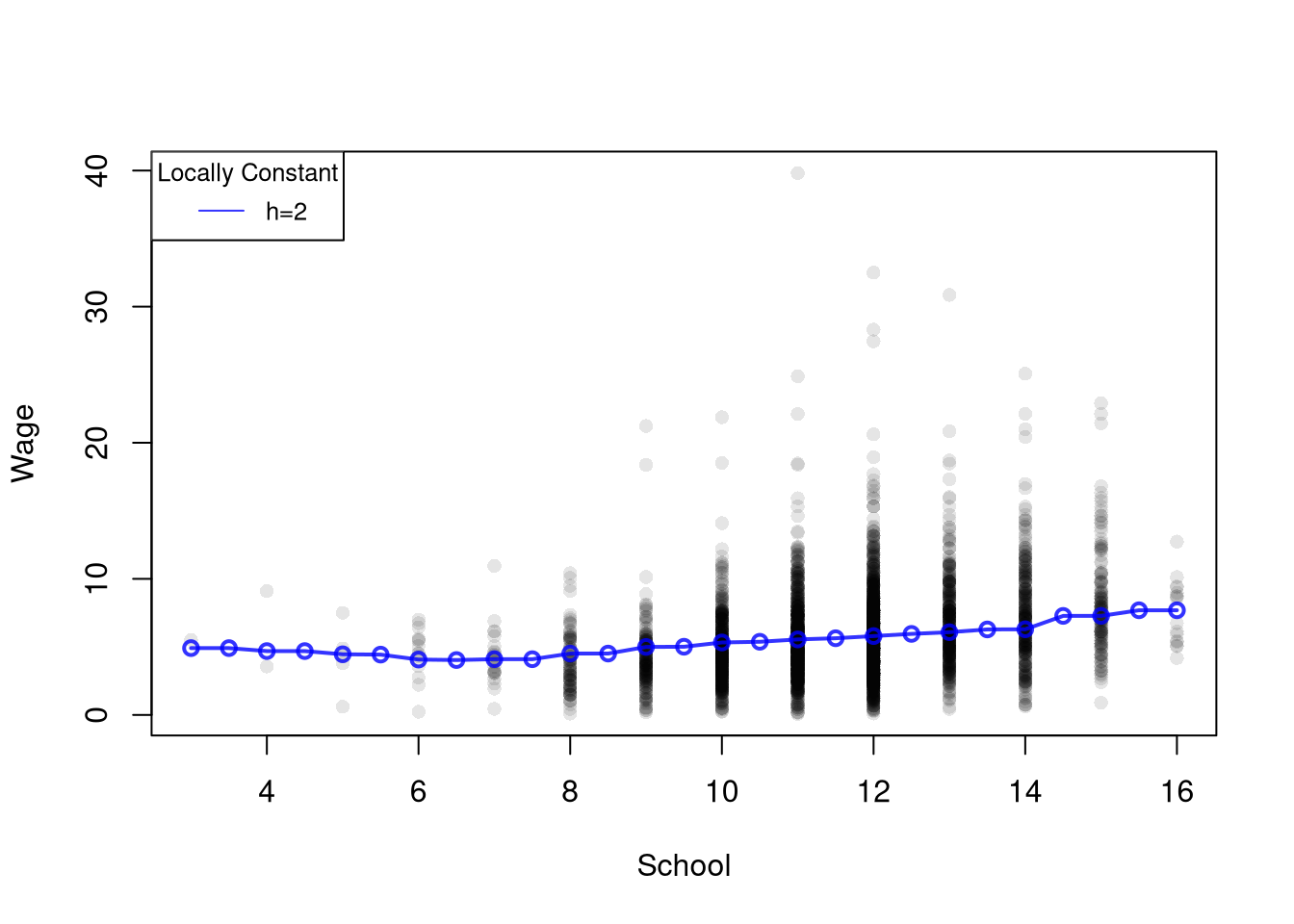
Here is the locally constant regression on the wage data. At each design point, we take the kernel-weighted average of wages for people with nearby years of schooling.
Code
# xy2_hat defined above
x_values <- seq(3, 16, by=.5) # Design points
h <- 2 # bandwidth

# Kernel-weighted mean at each design point
y_fit_lc <- rep(NA, length(x_values))
for (i in seq_along(x_values)) {
    ki <- dunif( abs(xy2_hat[, 'x_hat']-x_values[i])/h, -1, 1) # the uniform kernel k_U
    wi <- ki/sum(ki) # weights sum to one
    y_fit_lc[i] <- sum(wi*xy2_hat[, 'y_hat'])
}

# Plot
plot(y_hat ~ x_hat, data=xy2_hat, pch=16, col=grey(0, .1),
    main=NA, xlab='School', ylab='Wage')
lines(x_values, y_fit_lc, col=rgb(0, 0, 1, .8), lwd=2, type='o')
legend('topleft', title='Locally Constant',
    legend='h=2',
    lty=1, col=rgb(0, 0, 1, .8), cex=.8)
Notes
When \(n\) is small, \(\hat{b}_{0}(x, h)\) is typically estimated at each unique observed value of \(\hat{x}_{i}\). For large datasets, you can select a subset or evenly spaced values of \(x\) for which to make predictions.
If \(\hat{x}_{i}\) represents time, then the local constant regression is also called a moving average. We can create a weighted moving average by using a different distribution. I.e. using the Normal dnorm instead of the Uniform dunif.
The basic idea also generalizes other kernels. As such, a kernel regression using uniform weights is often called a “naive kernel regression”. Typically, kernel regressions use kernels that weight nearby observations more heavily.
Dividing the kernel weights by their sum, as in the locally constant code above, makes the fitted value an average of the \(\hat{y}_{i}\) in the window, even near the edges where part of the window is empty. Skipping that step gives a weighted sum rather than an average, as the example below shows.
Here is an example going into the details of the weights.
Code
## Generate Sample Data
x0_hat <- 1:5
y0_hat <- rnorm(length(x0_hat))
y0_hat
## [1] -0.8204684  0.4874291  0.7383247  0.5757814 -0.3053884

## Manually Compute Estimate at x=5
h <- 2
k5_weights <- dunif( abs(x0_hat-5)/h, -1, 1) #(x0_hat >= 3)*(x0_hat =< 7)/2
k5_weights
## [1] 0.0 0.0 0.5 0.5 0.5

y_fit_5 <- sum(k5_weights*y0_hat)
y_fit_5
## [1] 0.5043588

## Divide by the total so the weights sum to one
k5_weights_ec <- k5_weights/sum(k5_weights)
y_fit_5_ec <- sum(k5_weights_ec*y0_hat)
y_fit_5_ec
## [1] 0.3362392
Local Linear Regression
We can also add a slope term to the sliding window, so that each local fit can follow the trend within its window.
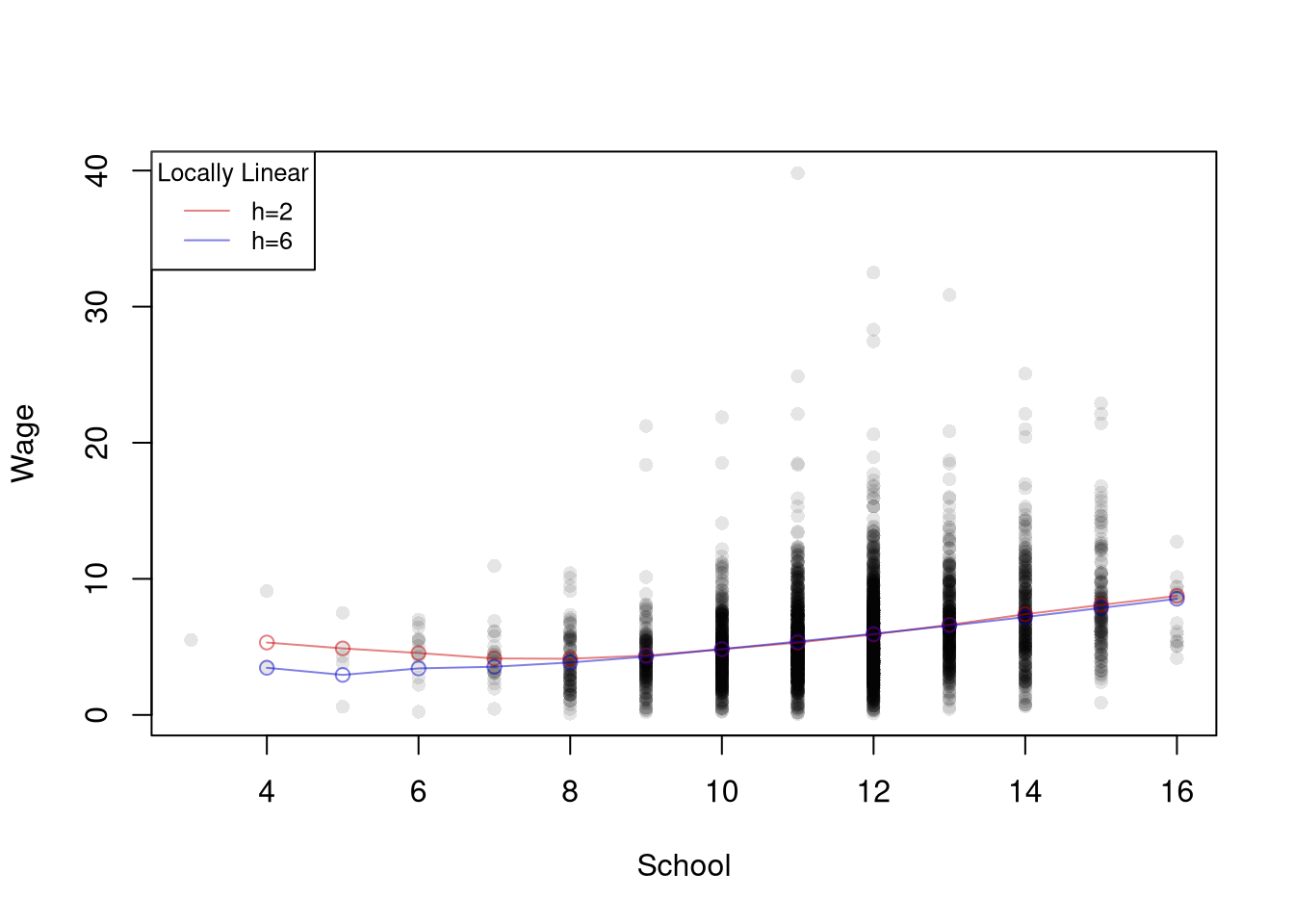
A local linear regression conducts a linear regression for each design point \(x\) using a subsample of data around it. The model is \(\hat{y}_{i} = b_{0}(x,h) + b_{1}(x,h) \hat{x}_{i} + \hat{e}_{i}\) for data near \(x\), and the coefficients minimize a kernel-weighted sum of squared residuals: \[\begin{aligned}
\min_{b_{0}(x, h),b_{1}(x, h)}~ \sum_{i}^{n}\left[\hat{y}_{i}- b_{0}(x, h) - b_{1}(x,h) \hat{x}_{i} \right]^2 k\left( \hat{x}_{i}, x, h\right),
\end{aligned}\] where \(k(\hat{x}_{i}, x, h)\) is a kernel weight. The fitted value at \(x\) is \(\hat{b}_{0}(x,h) + \hat{b}_{1}(x,h) x\).
Local linear regression is useful when the relationship slopes near the edges of the data, where the locally constant fit is biased, and it also reports a local slope \(\hat{b}_{1}(x,h)\) at every design point. It is the sliding-window version of piecewise regression: with the uniform kernel \(k_{U}\) and a design point at a bin midpoint, it reproduces the piecewise fit, as the weighted regression at \(x=6\) showed. Deriving the optimal values \(\hat{b}_{0}(x, h)\) and \(\hat{b}_{1}(x,h)\) for \(k_{U}\) is left as a homework exercise.
Code
# 'Naive' Smoother
pred_fun <- function(x0, h){
    # Assign equal weight to observations within h distance to x0
    # 0 weight for all other observations
    ki <- abs(xy2_hat[, 'x_hat']-x0)/h
    ki <- dunif(ki, -1, 1) ## The uniform kernel k_U; could change, e.g. dnorm(ki)
    wi <- ki/sum(ki, na.rm=TRUE) # always sum to 1 (for edge-effects)
    # run regression with weighted data
    llls_i <- lm(y_hat ~ x_hat, data=xy2_hat, weights=wi)
    y_fit <- predict(llls_i, newdata=data.frame(x_hat=x0))
}

x_values <- seq(4, 16, by=1) # Design points
# Fine Bins
y_fit_1 <- rep(NA, length(x_values))
for(i in seq_along(x_values)){
    y_fit_1[i] <- pred_fun(x0=x_values[i], h=2)
}
# Coarse Bins
y_fit_2 <- rep(NA, length(x_values))
for(i in seq_along(x_values)){
    y_fit_2[i] <- pred_fun(x0=x_values[i], h=6)
}

# Plot
plot(y_hat ~ x_hat, pch=16, data=xy2_hat, col=grey(0, .1),
    main=NA, ylab='Wage', xlab='School')
cols <- c(rgb(.8, 0, 0, .5), rgb(0, 0, .8, .5))
lines(x_values, y_fit_1, col=cols[1], lwd=1, type='o')
lines(x_values, y_fit_2, col=cols[2], lwd=1, type='o')
legend('topleft', title='Locally Linear',
    legend=c('h=2', 'h=6'),
    lty=1, col=cols, cex=.8)
Compare local linear and local constant regressions using https://shinyserv.es/shiny/kreg/, with degree \(0\) and \(1\). Also try different kernels and different datasets.
Examine the local relationship between ‘Murder’ and ‘Urbanization’ in the USArrests dataset using LLLS.
Code
# xy_hat defined above
# Same smoother as pred_fun, but for any data with columns x_hat and y_hat
pred_fun_xy <- function(x0, h, xy){
    ki <- abs(xy[, 'x_hat']-x0)/h
    ki <- dunif(ki, -1, 1) ## The uniform kernel k_U
    wi <- ki/sum(ki, na.rm=TRUE)
    llls_i <- lm(y_hat ~ x_hat, data=xy, weights=wi)
    y_fit <- predict(llls_i, newdata=data.frame(x_hat=x0))
}

x_values <- sort(unique(xy_hat[, 'x_hat']))
plot(y_hat ~ x_hat, pch=16, data=xy_hat, col=grey(0, .5),
    ylab='Murder Rate', xlab='Urban Population (%)')

y_fit_1 <- numeric(length(x_values))
for (i in seq_along(x_values)) {
    y_fit_1[i] <- pred_fun_xy(x_values[i], h=2, xy=xy_hat)
}

y_fit_2 <- numeric(length(x_values))
for (i in seq_along(x_values)) {
    y_fit_2[i] <- pred_fun_xy(x_values[i], h=20, xy=xy_hat)
}

cols <- c(rgb(.8, 0, 0, .5), rgb(0, 0, .8, .5))
lines(x_values, y_fit_1, col=cols[1], lwd=1, type='o')
lines(x_values, y_fit_2, col=cols[2], lwd=1, type='o')
legend('topleft', title='Locally Linear',
    legend=c('h=2 ', 'h=20'),
    lty=1, col=cols, cex=.8)
Exercises
Comment the script you wrote for this chapter, then restart R and check that it runs from a clean session, then check the script with AI as explained in Working with AI. Write three sentences from memory on the main statistical idea of this chapter, and ask the assistant what is wrong, vague, or missing. Finish with your own questions about whatever you found hardest.
Explain the difference between a regressogram and a local linear regression. As you increase the number of bins in a regressogram, what happens to the number of observations in each bin, and how does that change the fitted values?
Using the Wages1 dataset from the Ecdat package, fit a regressogram with 4 bins and a piecewise regression with 4 bins for the relationship between wage and school. Compute the predicted value at school = 10 for each model.
Using the USArrests dataset, write R code to estimate a local linear regression of Murder on UrbanPop using uniform kernel weights with bandwidth \(h = 10\). Compute predictions at design points x_values <- seq(40, 80, by = 10) and plot them over the scatterplot.
The chapter derives the optimal locally constant coefficient \(\hat{b}_{0}(x,h)\) but leaves the local linear case as an exercise. Starting from the weighted objective \(\sum_{i} [\hat{y}_{i} - b_{0} - b_{1}\hat{x}_{i}]^2 \, k_{U}(\hat{x}_{i}, x, h)\), set the partial derivatives with respect to \(b_{0}\) and \(b_{1}\) to zero. Show that the solution is the simple-regression formula applied to the kernel-weighted data: \(\hat{b}_{1}(x,h) = \hat{c}_{XY}(x,h)/\hat{v}_{X}(x,h)\) and \(\hat{b}_{0}(x,h) = \hat{m}_{Y}(x,h) - \hat{b}_{1}(x,h)\hat{m}_{X}(x,h)\).
Recall
This chapter let the wage-schooling relationship bend by fitting local models on the Wages1 data: regressograms (bin means), piecewise regression (bin lines), locally constant kernel regression, and locally linear regression. The three-observation worked example \(\{(3, 2), (4, 4), (12, 3)\}\) split into two bins at \(h=7/2\) gave regressogram coefficients \(\hat{b}_{0}(x=6, h=7/2)=(2+4)/2=3\) and \(\hat{b}_{0}(x=13, h=7/2)=3\).