Applied Methods
LOESS
When \(\hat{x}_{i}\) is unevenly distributed across its range, a fixed bandwidth \(h\) leaves some local fits with many neighbors and others with very few.
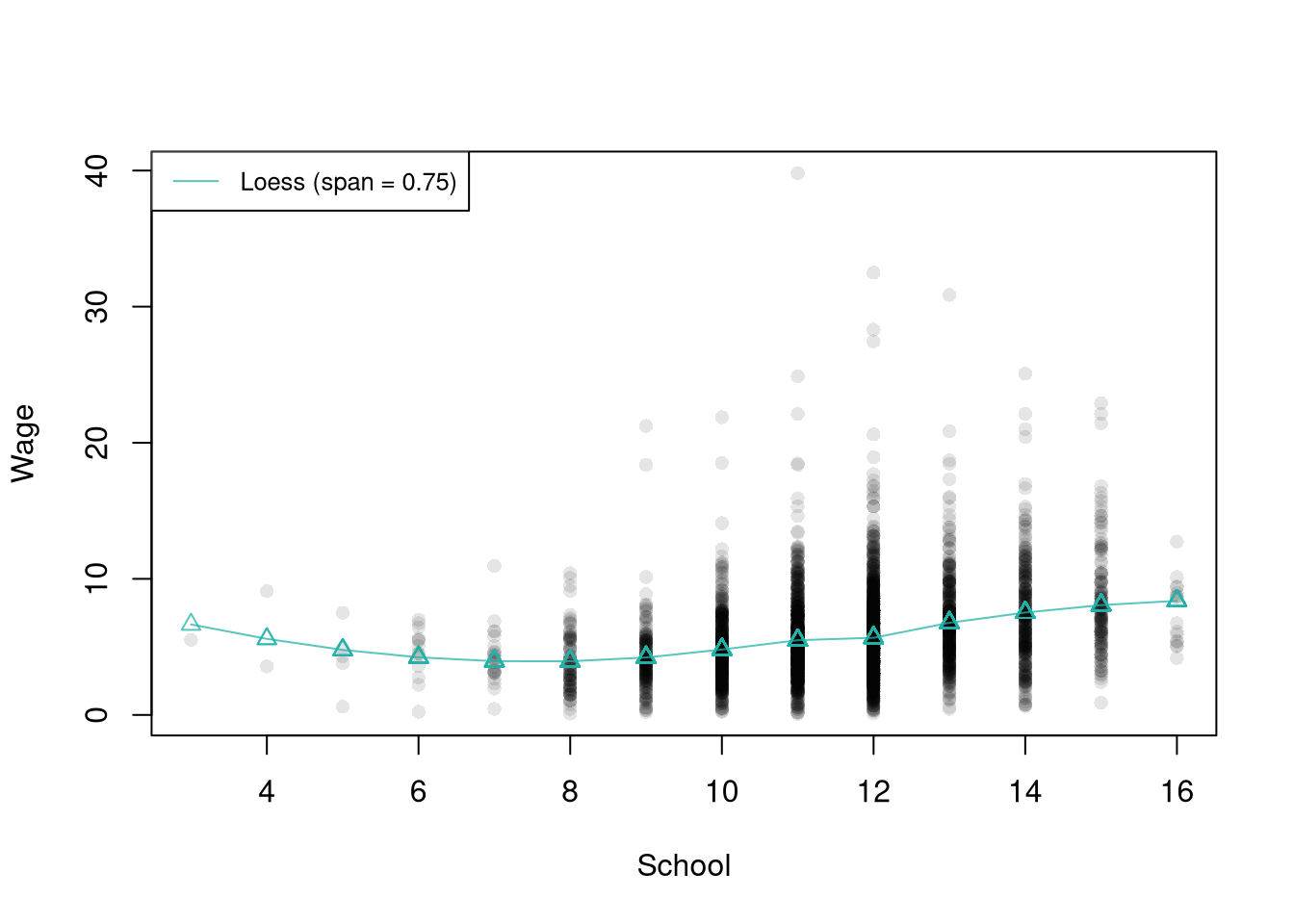
LOESS (locally estimated scatterplot smoothing) fits a local linear (or quadratic) regression at each design point using an adaptive bandwidth: instead of fixing \(h\), it includes a fixed share of the data at each \(x\), set by the parameter span.
LOESS is useful for smoothing data with uneven \(\hat{x}\): because the share of points in each neighborhood is fixed, the local fit has roughly the same effective sample size everywhere, even where the data are sparse. The span parameter plays the role \(h\) does for fixed-bandwidth methods, so smaller spans mean narrower neighborhoods, more flexibility, and noisier curves, while larger spans pool more data and smooth more aggressively.
Code
## Data
library(Ecdat)
xy2_hat <- Wages1[order(Wages1[, 'school']), c('school', 'wage')]
colnames(xy2_hat) <- c('x_hat', 'y_hat') # x_hat=years of schooling, y_hat=hourly wage

# Fit loess with the default span
reg_lo <- loess(y_hat ~ x_hat, data=xy2_hat)

plot(y_hat ~ x_hat, pch=16, col=grey(0, .1), data=xy2_hat,
    main=NA, xlab='School', ylab='Wage')
lo_col <- adjustcolor('#20B2AA', alpha.f=.75)  # teal green
lines(xy2_hat[, 'x_hat'], predict(reg_lo),
    col=lo_col, type='o', pch=2)

legend('topleft',
    legend=sprintf('Loess (span = %.2f)', reg_lo$pars$span),
    lty=1, col=lo_col, cex=.8)
Confidence Bands
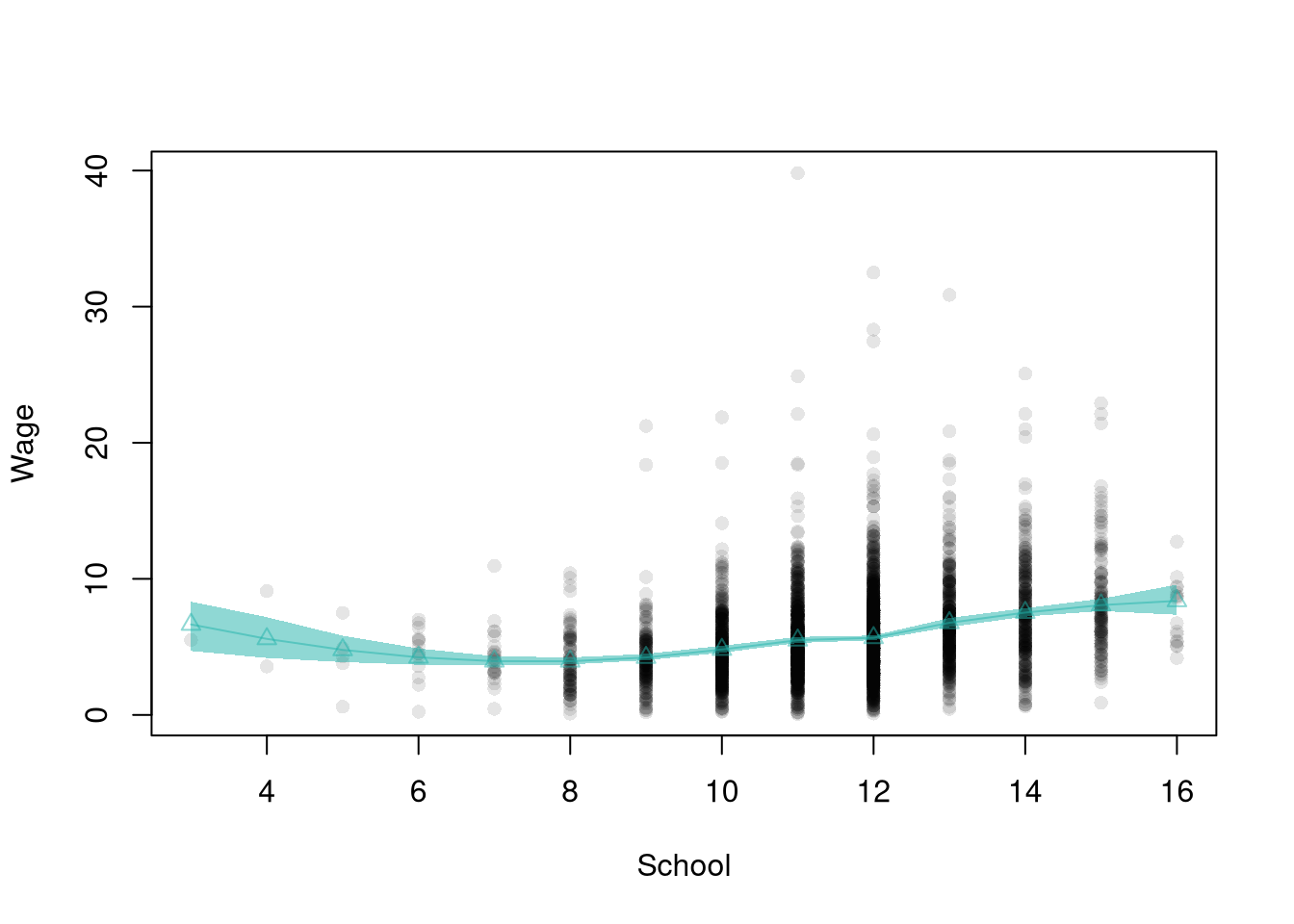
A single fitted curve does not show how much that curve would change in another sample, so we draw a region around it.
A confidence band is a confidence interval drawn at every design point: a region around the fitted curve that captures sample-to-sample variability. A bootstrap confidence band collects the predictions from many resamples and reads off pointwise quantiles at each \(x\).
Confidence bands are useful for showing where a fitted curve is well-supported by the data and where another sample could move it. The width is typically wider at the edges of \(\hat{x}\) (few neighbors) and narrower in the dense middle, which is itself a quick visual diagnostic. The same bootstrap that produces the band also produces standard errors for any single design point and for the gradient summaries below.
Code
# Same loess fit as above (default span)
pred_design <- data.frame(x_hat=unique(xy2_hat[, 'x_hat']))
y_fit <- predict(reg_lo, newdata=pred_design)

plot(y_hat ~ x_hat, pch=16, col=grey(0, .1), data=xy2_hat,
    main=NA, xlab='School', ylab='Wage')
lo_col <- adjustcolor('#20B2AA', alpha.f=.5)  # same teal green
lines(pred_design[, 'x_hat'], y_fit,
    col=lo_col, type='o', pch=2)

# Boot CI with the same default-span loess
boot_lo <- matrix(NA, nrow=nrow(pred_design), ncol=399)
for (b in 1:399) {
    xy2_boot <- xy2_hat[sample(nrow(xy2_hat), replace=TRUE), ]
    reg_b <- loess(y_hat ~ x_hat, data=xy2_boot)
    boot_lo[, b] <- predict(reg_b, newdata=pred_design)
}
boot_cb <- apply(boot_lo, 1, quantile,
    probs=c(.025, .975), na.rm=TRUE)

# Plot CI
polygon(
    c(pred_design[[1]], rev(pred_design[[1]])),
    c(boot_cb[1, ], rev(boot_cb[2, ])),
    col=lo_col,
    border=NA)
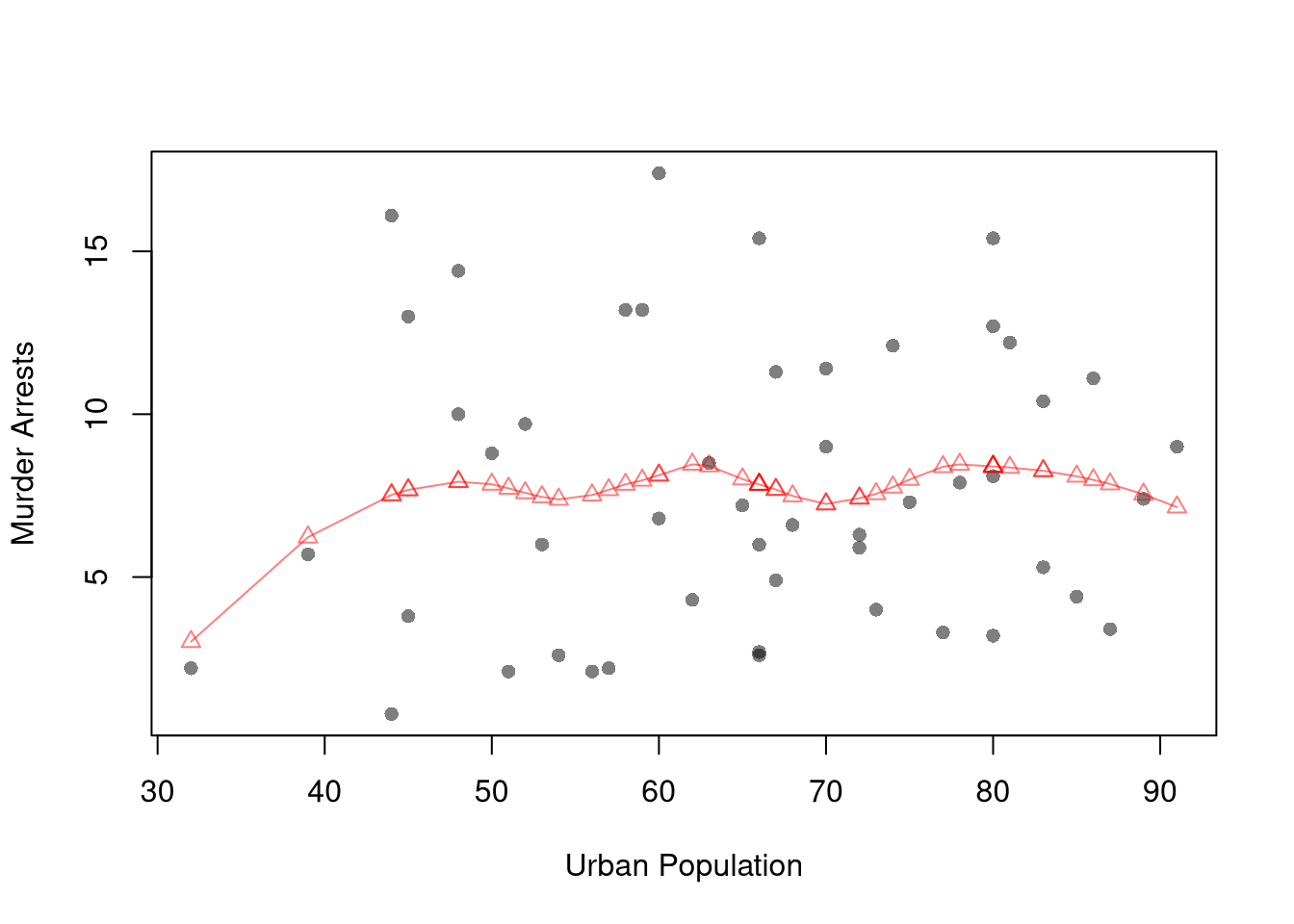
Construct a bootstrap confidence band for the following loess regression
Code
# Adaptive-width subsamples with non-uniform weights
xy_hat <- USArrests[, c('UrbanPop', 'Murder')]
colnames(xy_hat) <- c('x_hat', 'y_hat') # x_hat=urban population share, y_hat=murder arrests per 100K
xy_ord_hat <- xy_hat[order(xy_hat[, 'x_hat']), ]

plot(y_hat ~ x_hat, pch=16, col=grey(0, .5), data=xy_ord_hat,
    main=NA, xlab='Urban Population', ylab='Murder Arrests')
reg_lo_usa <- loess(y_hat ~ x_hat, data=xy_ord_hat, span=.6)

red_col <- rgb(1, 0, 0, .5)
lines(xy_ord_hat[, 'x_hat'], predict(reg_lo_usa),
    col=red_col, type='o', pch=2)
Model Fit
Each local model produces fitted values \(\hat{y}_{i}^{\mathrm{fit}}\) and residuals \(\hat{e}_{i} = \hat{y}_{i} - \hat{y}_{i}^{\mathrm{fit}}\). To compare models, we often summarize the residuals with a single number.
The mean squared error averages the squared residuals, \[\begin{aligned}
\hat{\text{MSE}} &= \frac{1}{n}\sum_{i=1}^{n} \hat{e}_{i}^2 = \frac{1}{n}\sum_{i=1}^{n} \left(\hat{y}_{i} - \hat{y}_{i}^{\mathrm{fit}}\right)^2.
\end{aligned}\] Squaring penalizes large misses heavily, and the units are the square of \(\hat{y}_{i}\) (squared dollars for wages).
The mean absolute percentage error instead averages each residual relative to its observed value, \[\begin{aligned}
\hat{\text{MAPE}} &= \frac{100}{n}\sum_{i=1}^{n} \left| \frac{\hat{e}_{i}}{\hat{y}_{i}} \right|.
\end{aligned}\] MAPE is unit-free, which makes it easy to communicate, but it is undefined when \(\hat{y}_{i}=0\) and over-weights observations with small \(\hat{y}_{i}\). MSE is easier to analyze theoretically (formally deriving the bias-variance tradeoff)
Suppose three workers have wages \(\hat{y}=(8, 10, 15)\) and a model predicts \(\hat{y}^{\mathrm{fit}}=(9, 9, 14)\). The residuals are \(\hat{e}=(-1, 1, 1)\), so \[\begin{aligned}
\hat{\text{MSE}} &= \frac{(-1)^2 + 1^2 + 1^2}{3} = \frac{3}{3} = 1, \\
\hat{\text{MAPE}} &= \frac{100}{3}\left( \frac{1}{8} + \frac{1}{10} + \frac{1}{15} \right) \approx \frac{100}{3}(0.292) \approx 9.7.
\end{aligned}\] The model misses by \(1\) squared-dollar on average, or about \(10\%\) of each wage.
Code
y0_hat <- c(8, 10, 15)
y0_fit <- c(9, 9, 14)
e0_hat <- y0_hat - y0_fit
mean(e0_hat^2)           # MSE
## [1] 1
100*mean(abs(e0_hat/y0_hat))  # MAPE
## [1] 9.722222
We can compute these for the linear, regressogram, and piecewise models on the wage~school data.
Code
# xy2_hat defined above

# Three models for wage on schooling
reg_lin <- lm(y_hat ~ x_hat, data=xy2_hat)        # globally linear
xy2_hat[, 'xcf'] <- cut(xy2_hat[, 'x_hat'], 3)
reg_rgram <- lm(y_hat ~ xcf, data=xy2_hat)         # regressogram, 3 bins
reg_pw    <- lm(y_hat ~ xcf*x_hat, data=xy2_hat)  # piecewise, 3 bins

# Mean squared error and mean absolute percentage error
fit_stats <- function(model){
    e_hat <- resid(model)
    y_hat <- xy2_hat[, 'y_hat']
    c(MSE=mean(e_hat^2), MAPE=100*mean(abs(e_hat/y_hat)))
}
round(rbind(
    Linear       = fit_stats(reg_lin),
    Regressogram = fit_stats(reg_rgram),
    Piecewise    = fit_stats(reg_pw)), 2)
##                MSE  MAPE
## Linear        9.83 73.27
## Regressogram 10.27 75.88
## Piecewise     9.73 72.82
Relationships
Gradients
Once the fitted curve can bend, “the slope” is no longer a single number; we want the slope locally at each \(x\).
A gradient \(\hat{b}_{1}(x)\) at the design point \(x\) is the rate of change of the fitted value \(\hat{y}^{\mathrm{fit}}(x)\) with respect to \(\hat{x}_{i}\) in a neighborhood of \(x\).
The gradient is useful as the local analog of the simple-regression slope: for a globally linear model it equals the single coefficient \(\hat{b}_{1}\) everywhere; for a local model it varies with \(x\) and traces out how the marginal relationship changes across the range of \(\hat{x}\). Three common ways to summarize gradients are:
For all methods, including regressograms, you can approximate gradients with small finite differences. For some small difference \(d\), we can manually compute \[\begin{aligned}
\hat{b}_{1}(x) &= \frac{ \hat{y}^{\mathrm{fit}}(x+\frac{d}{2}) - \hat{y}^{\mathrm{fit}}(x-\frac{d}{2})}{d},
\end{aligned}\]
When using split-sample regressions or local linear regressions, you can use the estimated slope coefficients \(\hat{b}_{1}(x)\) as a gradient estimate. One benefit of local linear regression is that it is theoretically motivated. Suppose that \(Y_{i}=m_{Y}(X_{i}) + \epsilon_{i}\), where \(m_{Y}(x)\) is the population average of \(Y_{i}\) among observations with \(X_{i}=x\), and \(\epsilon_{i}\) is an unobserved random error that averages zero at each value of \(X_{i}\). For \(X_{i}\) near \(x\), a Taylor approximation gives \[\begin{aligned}
m_{Y}(X_{i}) + \epsilon_{i} &\approx m_{Y}(x) + m_{Y}'(x)[X_{i}-x] + \epsilon_{i} \\
&= [m_{Y}(x) - m_{Y}'(x)x ] + m_{Y}'(x)X_{i} + \epsilon_{i} \\
&= b_{0}(x,h) + b_{1}(x,h) X_{i} + \epsilon_{i}.
\end{aligned}\] So near \(x\), the population relationship is approximately a line with slope \(b_{1}(x,h)=m_{Y}'(x)\), which is what a local linear regression fits.
More sophisticated methods that are beyond the scope of this class.
Suppose a local model predicts wages near \(x=12\) years of schooling: \(\hat{y}^{\mathrm{fit}}(11.5)=9.2\) and \(\hat{y}^{\mathrm{fit}}(12.5)=10.4\) (dollars per hour). With step \(d=1\), the finite-difference gradient at \(x=12\) is \[
\hat{b}_{1}(12) = \frac{\hat{y}^{\mathrm{fit}}(12.5) - \hat{y}^{\mathrm{fit}}(11.5)}{d} = \frac{10.4 - 9.2}{1} = 1.2.
\] Near \(12\) years of schooling, each extra year is associated with about \(\$1.20\) more per hour.
Code
d <- 1
y_fit_hi <- 10.4  # prediction at x + d/2
y_fit_lo <- 9.2   # prediction at x - d/2
(y_fit_hi - y_fit_lo) / d
## [1] 1.2
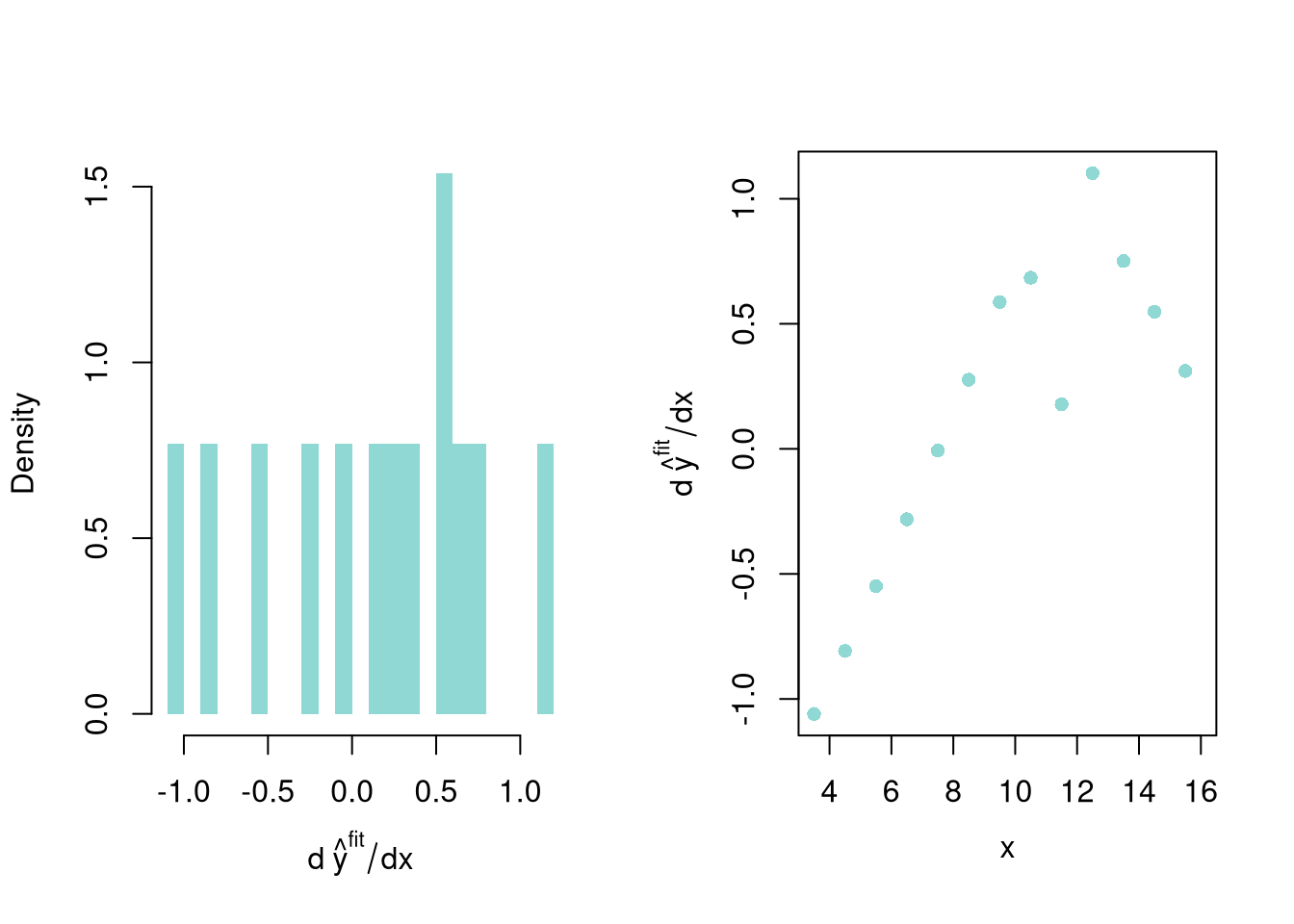
After computing gradients, you can summarize them in various plots: Histograms and Scatterplots. The confidence band only shows variability across samples, whereas these plots show variability within-sample. You can also plot all Gradients with their CI’s (Chaudhuri and Marron 1999; Henderson et al. 2012).
Code
## Gradients
y_fit <- predict(reg_lo)
grad_dx <- diff(xy2_hat[, 'x_hat'])
grad_dy <- diff(y_fit)
grad_lo <-grad_dy/grad_dx

## Visual Summary
par(mfrow=c(1, 2))
hist(grad_lo,  breaks=20,
    border=NA, freq=FALSE,
    col=lo_col,
    xlab=expression(d~hat(y)^plain(fit)/dx),
    main=NA) ## Distributional Summary

## Visual Summary 2
grad_x  <- xy2_hat[-nrow(xy2_hat), 'x_hat'] + grad_dx/2 # midpoint of consecutive x
plot(grad_x, grad_lo,
    xlab='x', ylab=expression(d~hat(y)^plain(fit)/dx),
    mgp=c(2.5, 1, 0),
    col=lo_col, pch=16, main=NA) ## Diminishing Returns?
A different kind of summary collapses the whole gradient curve into a single number for tabular reporting.
The gradient at the mean (sometimes called the marginal effect at the mean) evaluates the gradient at a single design point: \[\hat{b}_{1}(x=\hat{m}_{X}).\] The mean of the gradients (sometimes called the average effect or mean marginal effect) averages \(\hat{b}_{1}(x)\) across every observation in the dataset: \[\frac{1}{n}\sum_{i=1}^{n} \hat{b}_{1}(x=\hat{x}_{i}).\]
These two summaries are useful for different questions: the gradient at the mean answers “what is the slope at a typical \(\hat{x}_{i}\)?”, while the mean of the gradients answers “what is the average slope across the sample?”. The two coincide for a globally linear model but can differ for any other, sometimes substantially when the relationship bends. You may also be interested in the median of the gradients, or in measures of effect heterogeneity like the interquartile range or standard deviation of the gradients. Such statistics can be presented in tabular form: “mean gradient (sd gradient)” or “mean gradient (estimated SE), sd gradient (estimated SE)”.
These two summaries usually differ. Suppose a local model has gradients \(\hat{b}_{1}(x)\) at schooling levels \(x=(8,10,12,14,16)\) equal to \((0.4, 0.8, 1.2, 0.9, 0.3)\), and the sample mean schooling is \(\hat{m}_{X}=12\).
- The marginal effect at the mean is the single gradient at \(x=\hat{m}_{X}\): \(\hat{b}_{1}(12) = 1.2\).
- The mean of the gradients averages over all five points: \(\frac{0.4+0.8+1.2+0.9+0.3}{5} = \frac{3.6}{5} = 0.72\).
They differ because the gradient is not constant: here the relationship is steepest near the mean and flatter at the extremes.
Code
grads <- c(0.4, 0.8, 1.2, 0.9, 0.3)
grads[3]      # marginal effect at the mean (x = 12)
## [1] 1.2
mean(grads)   # mean of the gradients
## [1] 0.72
Code
## Gradient at each observation, as in the Key Definition
## Many workers share a schooling level, so each one gets the slope from their level to the next level up
grad_by_obs <- function(xy, reg) {
    x_levels <- sort(unique(xy[, 'x_hat']))
    y_fit_levels <- predict(reg, newdata=data.frame(x_hat=x_levels))
    grad_levels <- diff(y_fit_levels)/diff(x_levels)
    # The top level has no level above it, so it reuses the last slope
    grad_levels <- c(grad_levels, grad_levels[length(grad_levels)])
    grad_obs <- grad_levels[match(xy[, 'x_hat'], x_levels)]
    return(grad_obs)
}

## Tabular Summary
grad_obs <- grad_by_obs(xy2_hat, reg_lo)
tab_stats <- c(
    Mean=mean(grad_obs),
    SD=sd(grad_obs))

## Use bootstrap to approximate sampling dist
boot_stats <- matrix(NA, nrow=299, ncol=2)
colnames(boot_stats) <- c('Mean', 'SD')
for(b in 1:nrow(boot_stats)){
    xy2_boot <- xy2_hat[sample(1:nrow(xy2_hat), replace=TRUE), ]
    reg_lo_b <- loess(y_hat ~ x_hat, data=xy2_boot)
    grad_obs_b <- grad_by_obs(xy2_boot, reg_lo_b)
    m_grad_b_hat <- mean(grad_obs_b)
    s_grad_b_hat <- sd(grad_obs_b)
    boot_stats[b, 1] <- m_grad_b_hat
    boot_stats[b, 2] <- s_grad_b_hat
}
## SEs and CIs
boot_se <- apply(boot_stats, 2, sd)
boot_quants <- apply(boot_stats, 2, quantile, probs=c(0.025, 0.975))
boot_quants <- apply( round(boot_quants, 3), 2, paste0, collapse=', ')

## Printing
tab_regstyle <- data.frame(
  Estimate  = round(tab_stats, 3),
  SE = paste0('(', round(boot_se, 3), ')'),
  CI_95 = paste0('[', boot_quants, ']')
)
tab_regstyle
##      Estimate      SE          CI_95
## Mean    0.685 (0.062) [0.551, 0.796]
## SD      0.374 (0.103) [0.238, 0.615]
Summary of Local Gradients
| Mean |
0.68 |
(0.062) |
[0.551, 0.796] |
| SD |
0.37 |
(0.103) |
[0.238, 0.615] |
Hypothesis Testing
We can test whether the mean gradient is statistically different from zero. We can compute the p-value directly from the bootstrap distribution. Under \(H_0\), the mean gradient equals zero, so we center the bootstrap distribution at zero and ask how often it produces values as extreme as the observed mean gradient.
Code
## P-value via null bootstrap ECDF
## Center bootstrap means at zero (impose H0)
boot_centered <- boot_stats[, 'Mean'] - mean(boot_stats[, 'Mean'])

## ECDF of centered bootstrap distribution
F_hat <- ecdf(boot_centered)

## Two-sided p-value: P(|centered mean| >= |observed mean|)
p_boot <- 1 - F_hat(abs(tab_stats['Mean'])) +
              F_hat(-abs(tab_stats['Mean']))

cat('Bootstrap p-value (ECDF):', format.pval(p_boot, digits=3), '\n')
## Bootstrap p-value (ECDF): <2e-16
The small p-value indicates that the mean gradient is statistically distinguishable from zero: on average, wages increase with schooling.
We can also use a normal approximation. Under the null hypothesis \(H_0\): the mean gradient equals zero, we use the test statistic \[t = \frac{\text{mean gradient}}{\text{SE(mean gradient)}}\] and the p-value comes from the standard normal distribution.
Code
## P-value for mean gradient
## Standard Normal Approximation
t_stat <- tab_stats['Mean'] / boot_se['Mean']
p_val  <- 2 * pnorm(-abs(t_stat))

cat('Mean gradient:', round(tab_stats['Mean'], 3), '\n')
## Mean gradient: 0.685
cat('Bootstrap SE: ', round(boot_se['Mean'], 3), '\n')
## Bootstrap SE:  0.062
cat('t-statistic:  ', round(t_stat, 3), '\n')
## t-statistic:   11.13
cat('p-value:      ', format.pval(p_val, digits=3), '\n')
## p-value:       <2e-16
Compute the t-statistic and p-value using jackknife standard errors instead of the bootstrap.
Code
## Jackknife SE for mean gradient
n <- nrow(xy2_hat)
jack_means <- numeric(n)
for (i in 1:n) {
    xy2_i  <- xy2_hat[-i, ]
    reg_i  <- loess(y_hat ~ x_hat, data=xy2_i)
    grad_i <- grad_by_obs(xy2_i, reg_i)
    jack_means[i] <- mean(grad_i)
}

## Jackknife SE
jack_se <- sqrt((n - 1) / n * sum((jack_means - mean(jack_means))^2))

## t-statistic and p-value
t_jack <- tab_stats['Mean'] / jack_se
p_jack <- 2 * pnorm(-abs(t_jack))

cat('Jackknife SE: ', round(jack_se, 3), '\n')
## Jackknife SE:  0.06
cat('t-statistic:  ', round(t_jack, 3), '\n')
## t-statistic:   11.352
cat('p-value:      ', format.pval(p_jack, digits=3), '\n')
## p-value:       <2e-16
Bias-Variance Tradeoff
A better fit on the data you have is not automatically better, because a model can hit every point in the sample and still predict new observations poorly.
The bias-variance tradeoff describes two sources of model error: bias (systematic miss from over-smoothing) and variance (sample-to-sample wobble from under-smoothing).
The bias-variance tradeoff is useful for thinking about why a tuning parameter matters and how to set it. For local regressions, the bandwidth \(h\) (equivalently, the LOESS span) is the lever that governs the tradeoff: large \(h\) trades variance down for bias up, small \(h\) does the opposite. A loess fit narrow enough to interpolate every point has \(\hat{\text{MSE}}=0\) on the fit data but generalizes poorly because it has just copied the noise.
- Wide window (large span, large \(h\)): each local fit uses many observations, so the fitted curve barely changes from sample to sample (low variance). But a nearly flat fit over a wide region cannot follow a relationship that bends, so it is systematically off (high bias).
- Narrow window (small span, small \(h\)): each local fit uses few observations, so the fitted curve chases noise and swings from sample to sample (high variance). But a narrow window can track curvature closely (low bias).
Schooling takes only a few distinct values, so this section fits local linear LOESS (degree=1), which is more stable than the default local quadratic in small samples.
Code
# Two-span local linear loess with bootstrap confidence bands on one scatterplot
pred_design <- data.frame(x_hat=sort(unique(xy2_hat[, 'x_hat'])))
spans <- c(4.0, 0.4)
n_boot <- 399
span_col <- hcl.colors(3, alpha=.9)[c(1, 3)]

plot(y_hat ~ x_hat, data=xy2_hat, pch=16, col=grey(0, .1),
    main=NA, xlab='School', ylab='Wage')

for (s in seq_along(spans)) {
    sp <- spans[s]
    reg_s <- loess(y_hat ~ x_hat, data=xy2_hat, span=sp, degree=1)
    boot_preds <- matrix(NA, nrow=nrow(pred_design), ncol=n_boot)
    for (b in 1:n_boot) {
        xy2_boot <- xy2_hat[sample(nrow(xy2_hat), replace=TRUE), ]
        reg_s_b <- loess(y_hat ~ x_hat, data=xy2_boot, span=sp, degree=1)
        boot_preds[, b] <- predict(reg_s_b, newdata=pred_design)
    }
    boot_cb <- apply(boot_preds, 1, quantile,
        probs=c(.025, .975), na.rm=TRUE)

    polygon(c(pred_design[, 'x_hat'], rev(pred_design[, 'x_hat'])),
        c(boot_cb[1, ], rev(boot_cb[2, ])),
        col=adjustcolor(span_col[s], alpha.f=0.3), border=NA)
    lines(pred_design[, 'x_hat'], predict(reg_s, newdata=pred_design),
        col=span_col[s], lwd=2)
}

legend('topleft', title='LOESS span',
    legend=paste0(spans),
    col=span_col, lty=1, lwd=2, cex=.8)
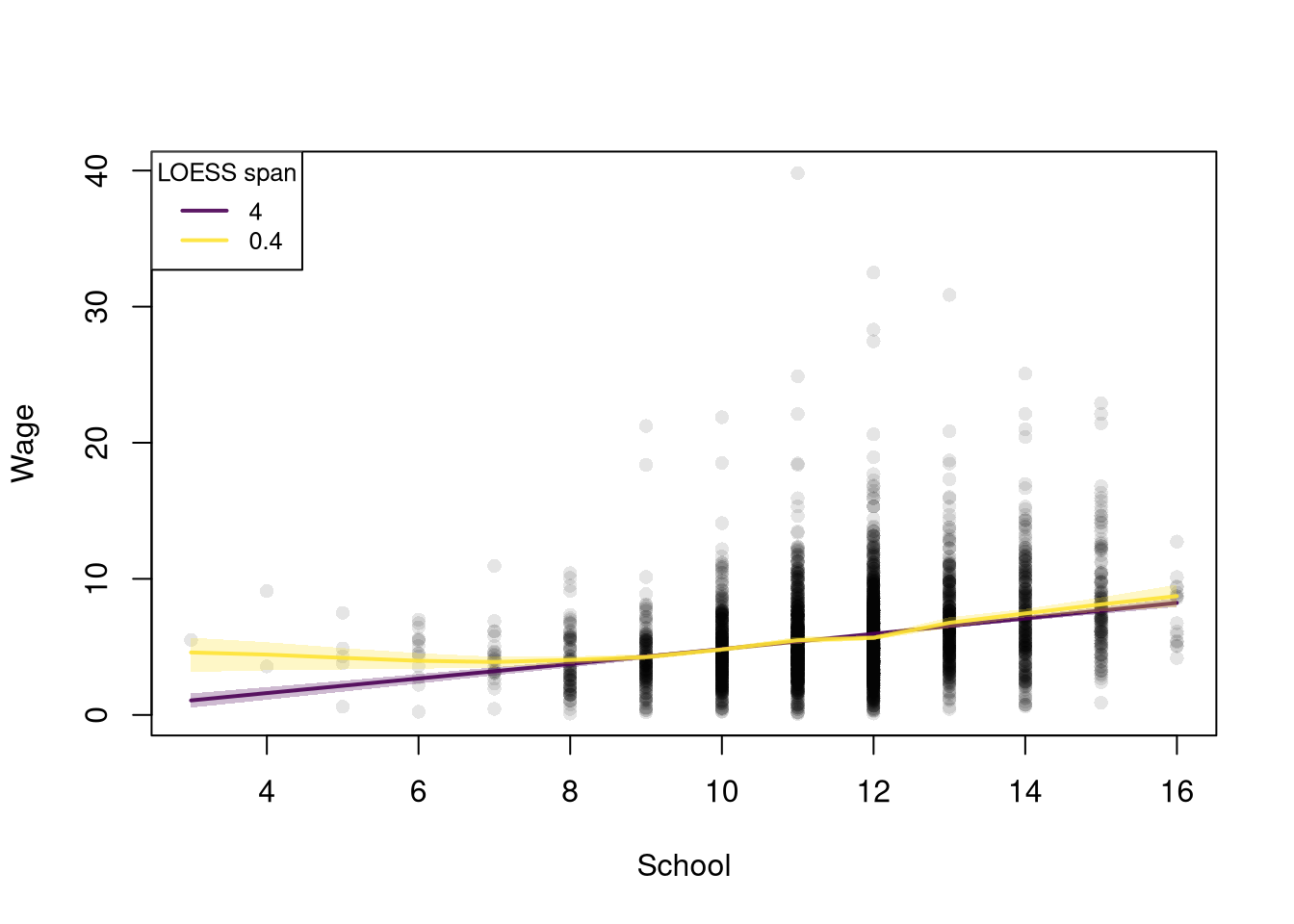
With span \(4.0\) the fitted curve is nearly a straight line and very stable, and the bootstrap band sits tightly around it. With span \(0.4\) the curve tracks more local variation, and the bootstrap band fans wider, directly displaying the variance penalty for chasing local detail. (Schooling x_hat is integer-valued and about a third of workers have exactly \(12\) years, so spans below about \(0.4\) leave no other schooling level near \(12\) and loess() breaks down there.)
With local linear fits, a very wide span gives every observation nearly the same weight, so the fit approaches the simple linear regression as \(h \to \infty\). A wide window and a narrow window can therefore also be read as a linear model and a flexible LOESS fit.
The bootstrap bands show variance, but not bias, because we never see the true curve in one sample. As in Sampling, pretend the \(3294\) workers in Wages1 are the whole population, so the true curve is known. The population curve is the mean wage at each schooling level over all \(3294\) workers. We evaluate it at \(8\) to \(15\) years of schooling, where there are many workers. The rest of this section compares the linear model, which acts as the widest possible window, with LOESS at span \(0.6\).
Code
# Pretend these 3294 workers are the whole population
data(Wages1, package='Ecdat')
population_xy <- Wages1[, c('school', 'wage')]
colnames(population_xy) <- c('x', 'y') # x=years of schooling, y=hourly wage

# Population curve: mean wage at each schooling level
population_curve <- tapply(population_xy[, 'y'], population_xy[, 'x'], mean)

# Evaluate at schooling levels with many workers (8 to 15 years)
# Rare levels are often missing from a sample, and loess does not extrapolate
x_levels <- 8:15
population_levels <- population_curve[as.character(x_levels)]

# Draw a simple random sample of n workers from the population
draw_xy <- function(n=300){
    s_id <- sample(nrow(population_xy), n, replace=FALSE)
    xy_sim <- population_xy[s_id, ]
    colnames(xy_sim) <- c('x_hat', 'y_hat')
    return(xy_sim)
}

# Span for all local linear fits in the main text
span_wage <- 0.6
Sampling Distributions
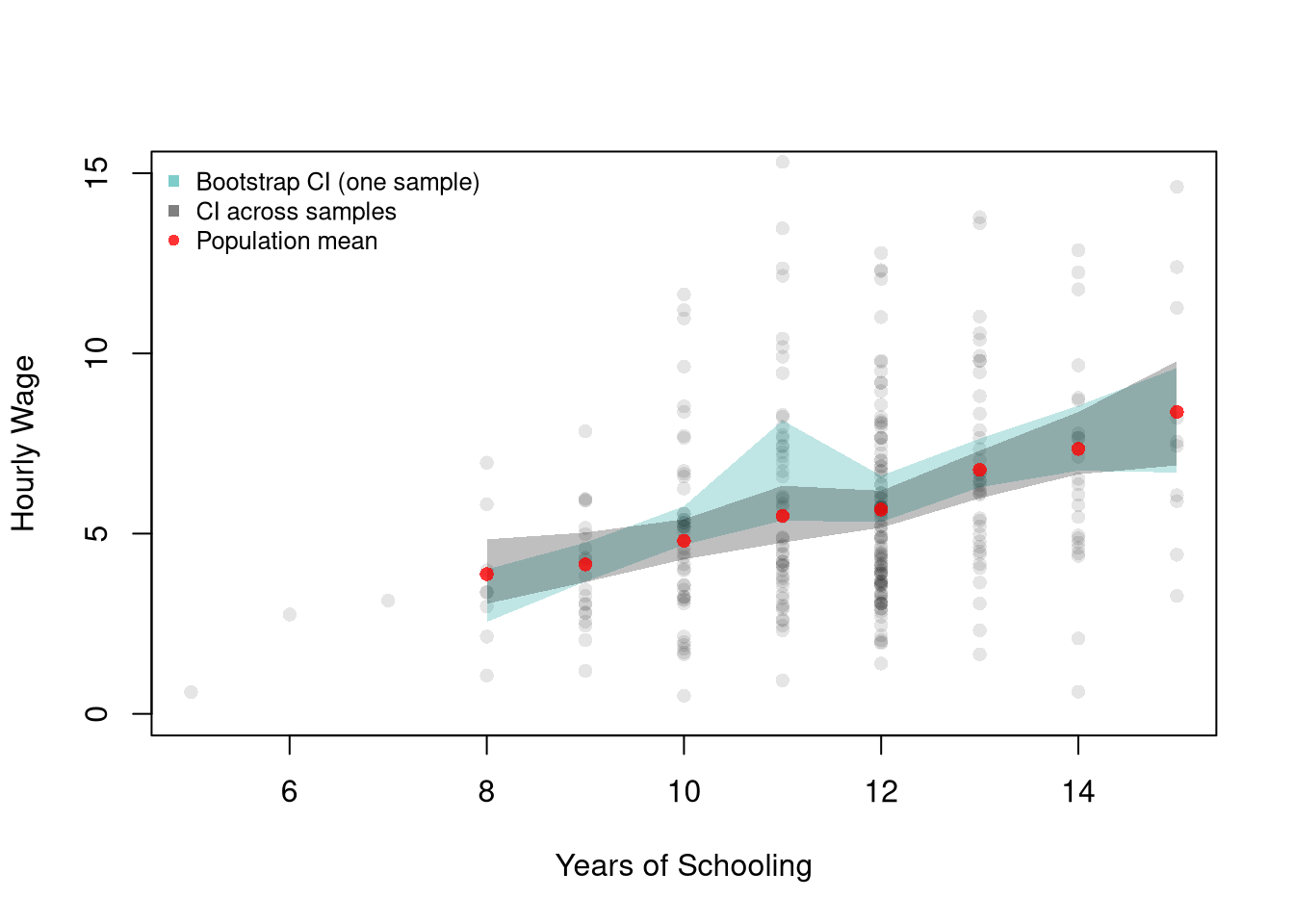
Bootstrap confidence bands are approximations: they estimate how much predicted values vary from sample to sample. The simulation below compares a bootstrap CI constructed from one sample of \(300\) workers to the true sampling variation observed across many independent samples from the population.
Code
## Data from one sample
xy_sim <- draw_xy(300)
plot(y_hat ~ x_hat, data=xy_sim, pch=16, col=grey(0, .1),
    ylim=c(0, 15), # zoom in on the fitted curves
    main=NA, ylab='Hourly Wage', xlab='Years of Schooling')

## Plot Bootstrap CI for Single Sample
pred_design <- data.frame(x_hat=x_levels)
boot_lo <- matrix(NA, nrow=nrow(pred_design), ncol=399)
for (b in 1:399) {
    xy_boot <- xy_sim[sample(nrow(xy_sim), replace=TRUE), ]
    reg_b <- loess(y_hat ~ x_hat, data=xy_boot, span=span_wage, degree=1)
    boot_lo[, b] <- predict(reg_b, newdata=pred_design)
}
boot_cb <- apply(boot_lo, 1, quantile,
    probs=c(.025, .975), na.rm=TRUE)
polygon(
    c(pred_design[[1]], rev(pred_design[[1]])),
    c(boot_cb[1, ], rev(boot_cb[2, ])),
    col=hcl.colors(3, alpha=.25)[2],
    border=NA)

# Construct CI across Multiple Samples from the population
sample_lo <- matrix(NA, nrow=nrow(pred_design), ncol=399)
for (b in 1:399) {
    xy_sim_b <- draw_xy(300) # Entirely new sample
    reg_b <- loess(y_hat ~ x_hat, data=xy_sim_b, span=span_wage, degree=1)
    sample_lo[, b] <- predict(reg_b, newdata=pred_design)
}
ci_lo <- apply(sample_lo, 1, quantile,
    probs=c(.025, .975), na.rm=TRUE)
polygon(
    c(pred_design[[1]], rev(pred_design[[1]])),
    c(ci_lo[1, ], rev(ci_lo[2, ])),
    col=grey(0, alpha=.25),
    border=NA)

# Population curve
points(x_levels, population_levels, pch=16, col=rgb(1, 0, 0, .8))
legend('topleft', bty='n', cex=.8,
    legend=c('Bootstrap CI (one sample)', 'CI across samples', 'Population mean'),
    pch=c(15, 15, 16),
    col=c(hcl.colors(3, alpha=.5)[2], grey(0, .5), rgb(1, 0, 0, .8)))
The two bands typically have a similar width, so the bootstrap from one sample gives a reasonable idea of the variation across samples. The bootstrap band is centered on the one sample we happen to have, however, so it can sit a little above or below the population curve.
Bias
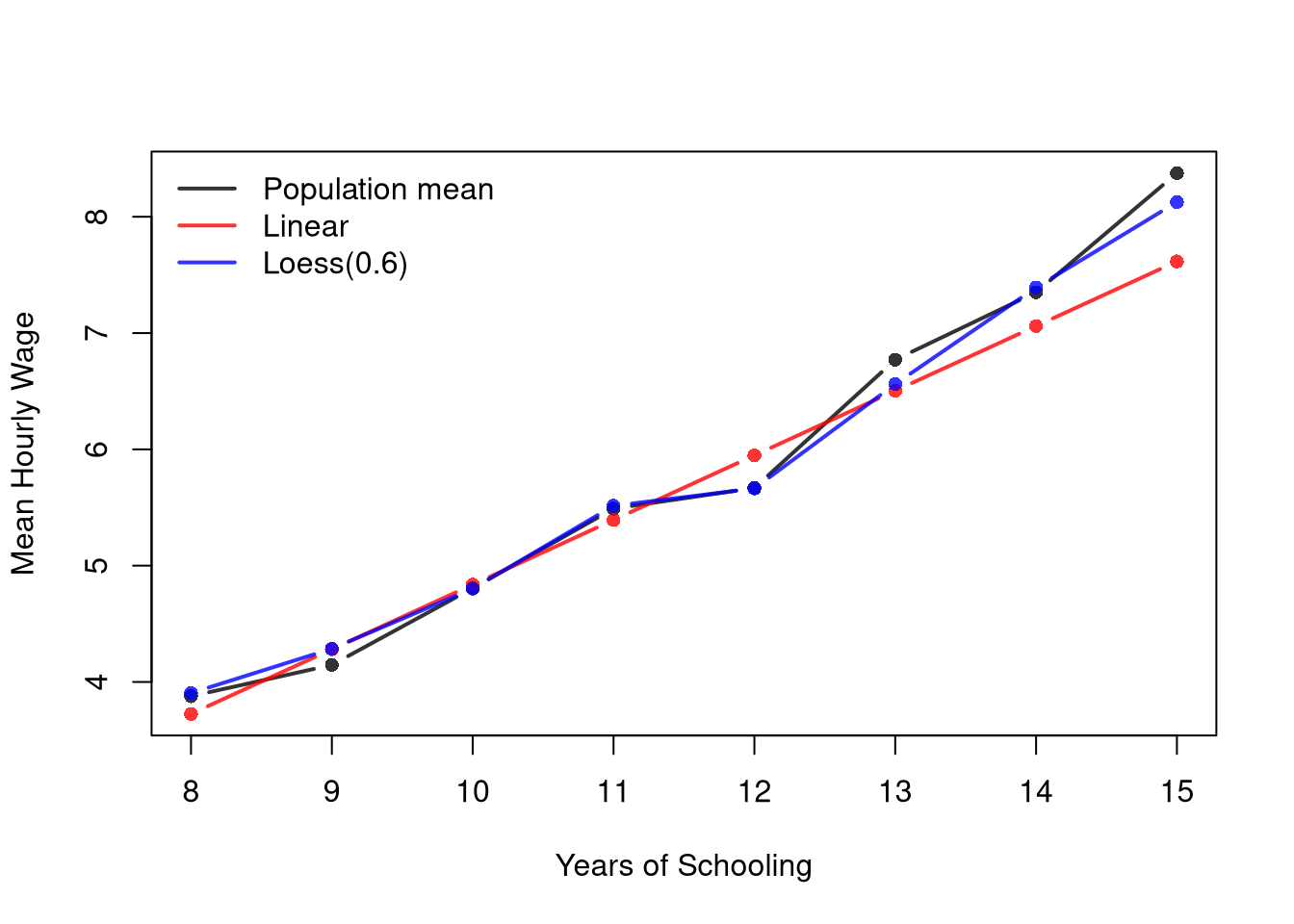
The plot below shows the average prediction across many samples of \(200\) workers against the population mean wage at each schooling level. Notice that LOESS tracks the population curve closely. Notice that a linear model does not: it is too high at \(12\) years of schooling and too low at \(13\) to \(15\) years.
Code
## Shared settings used by Bias, Variance, and the Decomposition
n_rep <- 300
n_seq <- c(50, 100, 200, 400, 800)
n_bias <- 200
x_target <- 12 # high school graduates

## Predictions at x_target: one row per sample, one column per sample size
target_lm_sim <- matrix(NA, nrow=n_rep, ncol=length(n_seq))
target_lo_sim <- matrix(NA, nrow=n_rep, ncol=length(n_seq))

## Predictions at every schooling level when n == n_bias
curves_lm_sim <- matrix(NA, nrow=length(x_levels), ncol=n_rep)
curves_lo_sim <- matrix(NA, nrow=length(x_levels), ncol=n_rep)

## One sweep over sample sizes
for (ni in seq_along(n_seq)) {
    n <- n_seq[ni]
    for (r in 1:n_rep) {
        xy_sim <- draw_xy(n)
        fit_lm <- lm(y_hat ~ x_hat, data=xy_sim)
        fit_lo <- loess(y_hat ~ x_hat, data=xy_sim, span=span_wage, degree=1)
        pred_lm <- predict(fit_lm, newdata=data.frame(x_hat=x_levels))
        pred_lo <- predict(fit_lo, newdata=data.frame(x_hat=x_levels))
        target_lm_sim[r, ni] <- pred_lm[x_levels == x_target]
        target_lo_sim[r, ni] <- pred_lo[x_levels == x_target]
        if (n == n_bias) {
            curves_lm_sim[, r] <- pred_lm
            curves_lo_sim[, r] <- pred_lo
        }
    }
}
Code
m_lm_hat <- rowMeans(curves_lm_sim, na.rm=TRUE)
m_lo_hat <- rowMeans(curves_lo_sim, na.rm=TRUE)

y_rng <- range(c(population_levels, m_lm_hat, m_lo_hat), na.rm=TRUE)
plot(x_levels, population_levels, type='b', pch=16, lwd=2,
    col=rgb(0, 0, 0, .8), ylim=y_rng,
    xlab='Years of Schooling', ylab='Mean Hourly Wage', main=NA)
lines(x_levels, m_lm_hat, type='b', pch=16, lwd=2, col=rgb(1, 0, 0, .8))
lines(x_levels, m_lo_hat, type='b', pch=16, lwd=2, col=rgb(0, 0, 1, .8))
legend('topleft', lty=1, lwd=2, bty='n',
    col=c(rgb(0, 0, 0, .8), rgb(1, 0, 0, .8), rgb(0, 0, 1, .8)),
    legend=c('Population mean',
        'Linear',
        paste0('Loess(', span_wage, ')')
))
The linear bias does not go away with more data. Fit to the whole population, the line predicts a mean wage of \(5.96\) at \(12\) years of schooling, while the population mean is \(5.67\).
Boundary Bias
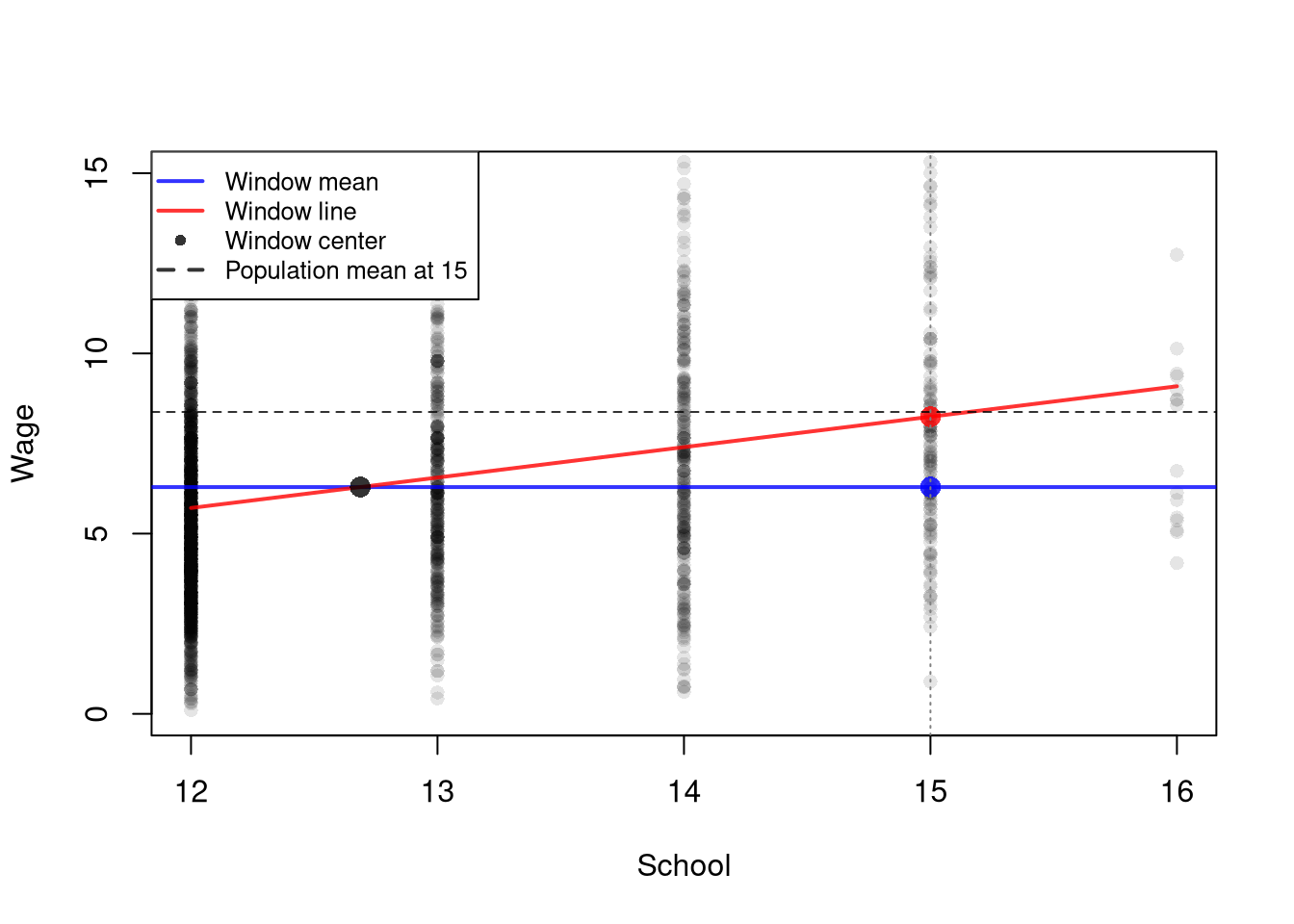
The local regressions from Local Regression have their own source of bias near the edges of the data. The regressogram has a bias at the edges of the bins, which is addressed by the locally constant regression. Still, the local constant regression has a bias near the edges of the dataset. At \(x=15\), near the top of the data, the window \([11.5, 18.5]\) runs past the most schooling anyone has, 16 years. So most of the observations in it, about 92 percent, have less schooling than the design point. The window average then describes a group whose average schooling is about 12.7 years, not 15. Because wages rise with schooling, that average understates the population mean wage at \(x=15\).
Code
# Locally constant fit near the top edge of the data
x <- 15 # design point
h <- 3.5 # window [11.5, 18.5] holds schooling levels 12 to 16
k_weights <- dunif( abs(xy2_hat[, 'x_hat']-x)/h, -1, 1) # the uniform kernel k_U
xy2_window <- xy2_hat[k_weights > 0, ]
m_x <- mean(xy2_window[, 'x_hat']) # average schooling in the window
m_y <- mean(xy2_window[, 'y_hat']) # locally constant fit at x=15
c(m_x=m_x, m_y=m_y)
##       m_x       m_y
## 12.686759  6.291988

# A line fit to the same window, evaluated at the design point
reg_window <- lm(y_hat ~ x_hat, data=xy2_window)
y_fit_line <- predict(reg_window, newdata=data.frame(x_hat=x))
y_fit_line
##        1
## 8.244139

# Population mean wage at the design point
y_pop <- population_curve[as.character(x)]
y_pop
##       15
## 8.375111

# Plot the window
plot(y_hat ~ x_hat, data=xy2_window, pch=16, col=grey(0, .1),
    ylim=c(0, 15), # zoom in on the fits
    main=NA, xlab='School', ylab='Wage')
abline(h=m_y, col=rgb(0, 0, 1, .8), lwd=2) # window mean
lines(c(12, 16), predict(reg_window, newdata=data.frame(x_hat=c(12, 16))),
    col=rgb(1, 0, 0, .8), lwd=2) # window line
points(m_x, m_y, pch=16, col=rgb(0, 0, 0, .8), cex=1.5) # window center
points(c(x, x), c(m_y, y_fit_line), pch=16, cex=1.5,
    col=c(rgb(0, 0, 1, .8), rgb(1, 0, 0, .8))) # the two fits at x=15
abline(h=y_pop, col=rgb(0, 0, 0, .8), lty=2) # population mean at x=15
abline(v=x, col=grey(.5), lty=3)
legend('topleft',
    legend=c('Window mean', 'Window line', 'Window center', 'Population mean at 15'),
    col=c(rgb(0, 0, 1, .8), rgb(1, 0, 0, .8), rgb(0, 0, 0, .8), rgb(0, 0, 0, .8)),
    lty=c(1, 1, NA, 2), pch=c(NA, NA, 16, NA), lwd=2, cex=.8, bg='white')
The window mean, about \(6.29\), sits far below the population mean of \(8.38\). A line fit to the same window passes through the window center \((\hat{m}_{X}(x,h), \hat{m}_{Y}(x,h))\), just as the simple regression line passes through the point of means in Simple Linear Regression. Unlike the window mean, the line follows the trend out to the design point, where it predicts about \(8.24\). So a local linear regression has less bias near the edges of the data.
Variance
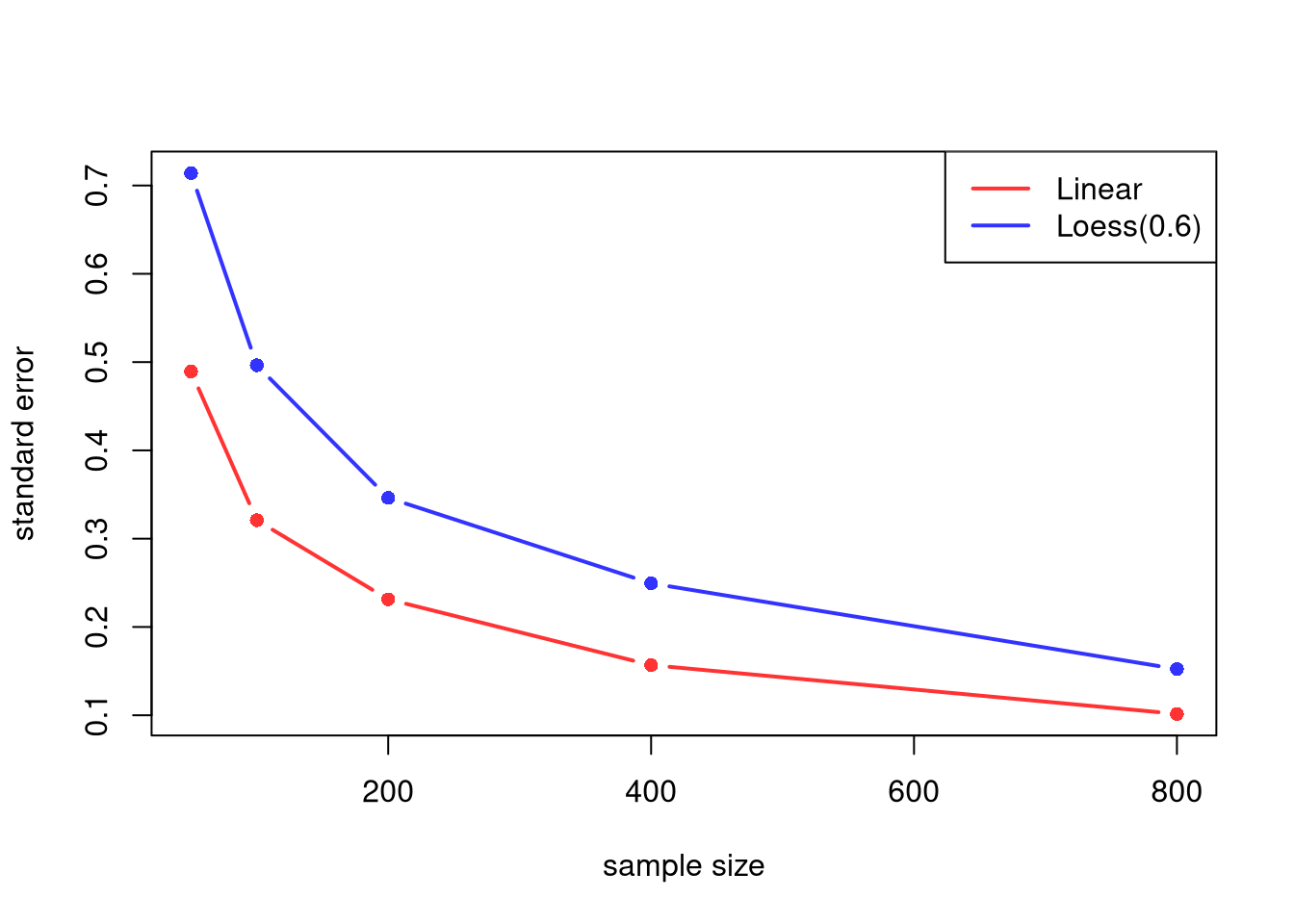
The model estimates also vary from sample to sample. The plot below shows the standard error of each model’s predicted mean wage at \(12\) years of schooling, computed across the repeated samples. Notice that the linear prediction generally varies less than the LOESS prediction, even though it is biased.
Also notice that there are diminishing returns to larger sample sizes. Both predictions vary less from sample to sample as \(n\) grows, making confidence intervals narrower and hypothesis tests more accurate.
Code
se_sim <- rbind(
    apply(target_lm_sim, 2, sd, na.rm=TRUE),
    apply(target_lo_sim, 2, sd, na.rm=TRUE))
cols <- c(rgb(1, 0, 0, .8), rgb(0, 0, 1, .8))
matplot(n_seq, t(se_sim), type='b', pch=16,
    lty=1, lwd=2, col=cols,
    ylab='standard error', xlab='sample size',
    main=NA)
legend('topright',
    lty=1, lwd=2, col=cols,
    legend=c('Linear', paste0('Loess(', span_wage, ')')))
Bias-Variance Decomposition
Squared bias and variance combine into a single measure of prediction error.
The expected prediction error of an estimator decomposes into two pieces. Squared bias is how far its average prediction sits from the truth. Variance is how much its predictions wobble around their own average.
The bias-variance decomposition is useful as the formal expression of why we cannot simply minimize one source of error and ignore the other: cutting one usually raises the other, so there is a tradeoff to navigate.
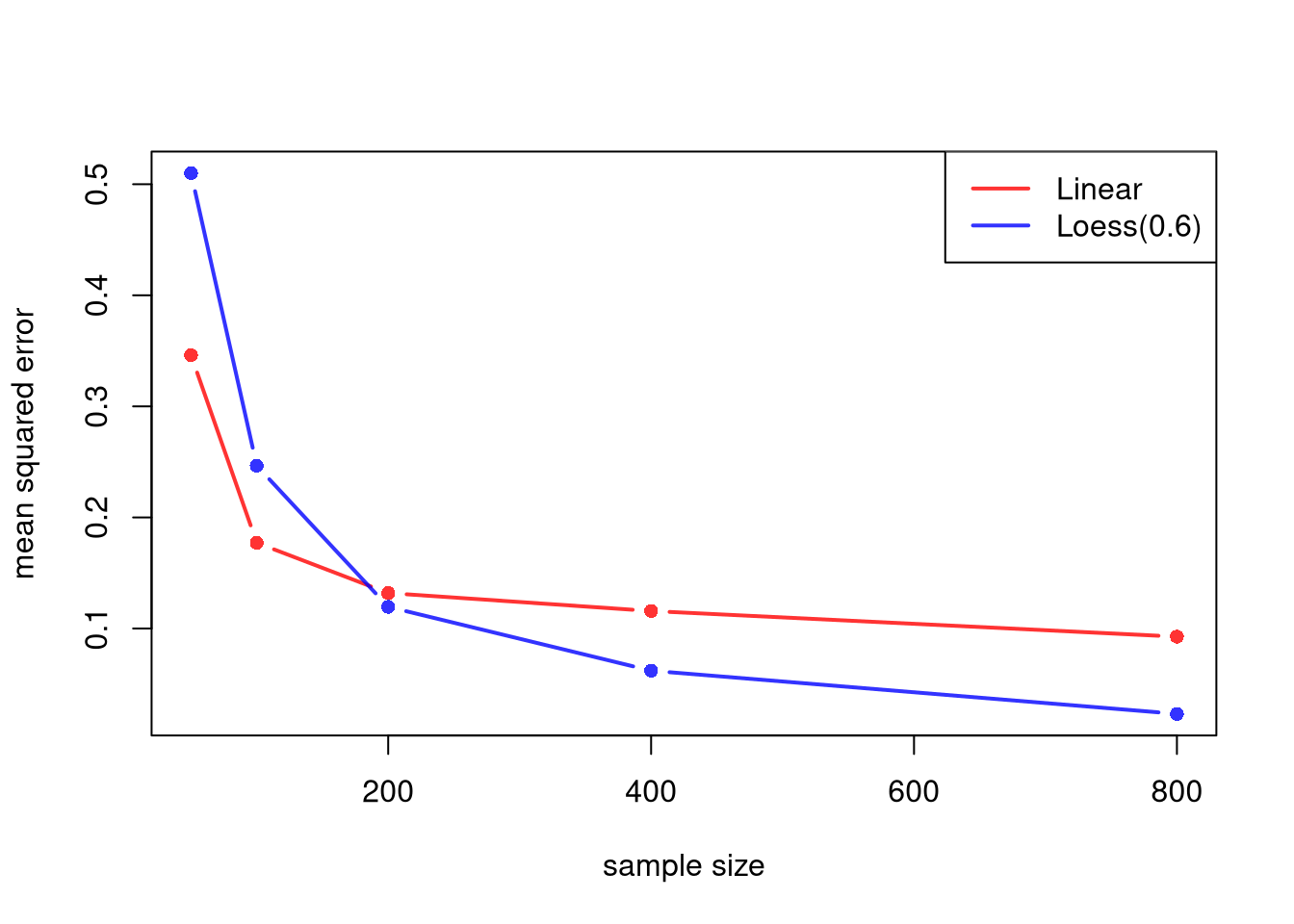
The mean squared error (MSE) adds the two pieces together. The code below computes the squared bias, the variance, and the MSE of each model’s prediction at \(12\) years of schooling, for each sample size.
Code
# Squared bias, variance, and MSE for each column (sample size)
truth_target <- population_curve[as.character(x_target)]
mse_parts <- function(P, truth){
    bias2 <- (colMeans(P, na.rm=TRUE) - truth)^2
    variance <- apply(P, 2, var, na.rm=TRUE)
    mse <- colMeans((P - truth)^2, na.rm=TRUE)
    return(cbind(bias2, variance, mse))
}
parts_lm <- mse_parts(target_lm_sim, truth_target)
parts_lo <- mse_parts(target_lo_sim, truth_target)
rownames(parts_lm) <- rownames(parts_lo) <- paste0('n=', n_seq)
round(parts_lm, 3) # Linear
##       bias2 variance   mse
## n=50  0.107    0.239 0.346
## n=100 0.075    0.103 0.177
## n=200 0.079    0.053 0.132
## n=400 0.091    0.025 0.116
## n=800 0.082    0.010 0.093
round(parts_lo, 3) # Loess
##       bias2 variance   mse
## n=50  0.002    0.510 0.510
## n=100 0.001    0.246 0.247
## n=200 0.000    0.120 0.119
## n=400 0.000    0.062 0.062
## n=800 0.000    0.023 0.023

# MSE across sample sizes
cols <- c(rgb(1, 0, 0, .8), rgb(0, 0, 1, .8))
matplot(n_seq, cbind(parts_lm[, 'mse'], parts_lo[, 'mse']),
    type='b', pch=16, lty=1, lwd=2, col=cols,
    ylab='mean squared error', xlab='sample size',
    main=NA)
legend('topright',
    lty=1, lwd=2, col=cols,
    legend=c('Linear', paste0('Loess(', span_wage, ')')))
For the linear model, the squared bias stays roughly the same as \(n\) grows, while the variance shrinks. For LOESS, the squared bias is typically close to zero, and the MSE is mostly variance. With small samples, the stable linear model typically has the lower MSE. With large samples, the flexible LOESS model typically has the lower MSE.
Consistency
The bias-variance tradeoff raises a question: can both be reduced simultaneously as \(n\) grows? For local regression, the answer is yes, provided we shrink the bandwidth as \(n\) grows. The neighborhood shrinks (reducing bias) while the local sample size still grows (reducing variance). This is often written as bandwidth conditions: \[
h_n \to 0
\quad\text{and}\quad
n h_n \to \infty.
\] In LOESS language, this corresponds to the span shrinking with \(n\), but not too fast.
A common bandwidth rule shrinks \(h\) with the sample size, for example \(h_{n}=n^{-1/5}\). Check the two conditions:
- \(h_{n}=n^{-1/5}\to 0\): at \(n=100\) it is about \(0.40\); at \(n=10{,}000\) it is about \(0.16\). The neighborhood shrinks.
- \(n h_{n}=n^{4/5}\to\infty\): at \(n=100\) it is about \(40\); at \(n=10{,}000\) it is about \(1585\). The local sample size still grows.
So bias falls (the window narrows) while variance falls (each local fit uses more data).
Code
n <- c(100, 10000)
h_n <- n^(-1/5)
rbind(h_n=round(h_n, 3), n_times_h=round(n*h_n, 1))
##             [,1]     [,2]
## h_n        0.398    0.158
## n_times_h 39.800 1584.900
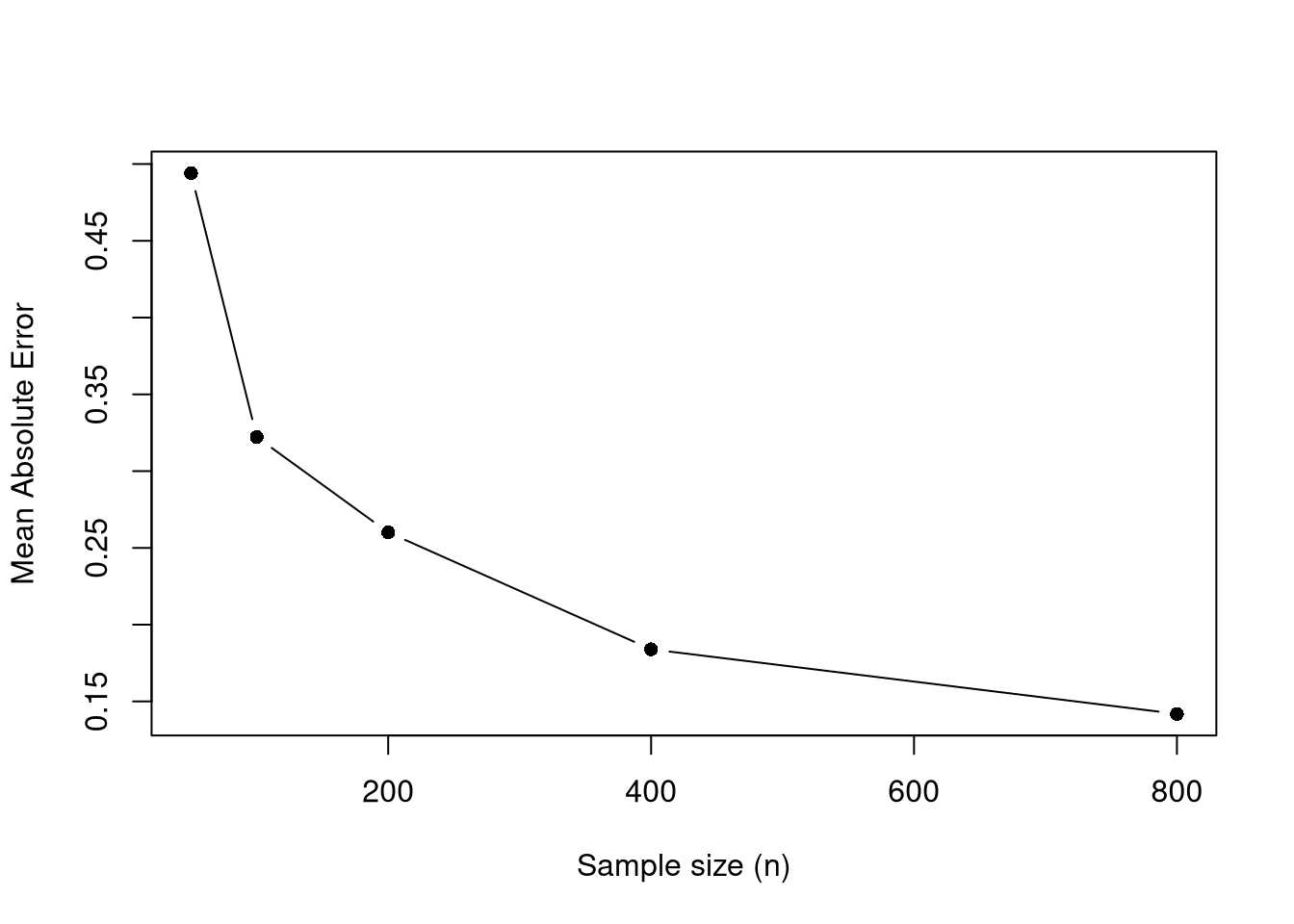
The simulation below illustrates this at one target point, \(12\) years of schooling. The span is \(2n^{-1/5}\), which satisfies the same two conditions as \(n^{-1/5}\). The factor \(2\) keeps the span above \(0.5\) for these sample sizes, since about a third of workers have exactly \(12\) years of schooling and narrower spans can leave no other schooling levels in the neighborhood, where loess() breaks down. The mean absolute error in estimating the population mean wage tends to decrease with larger \(n\).
Code
x_target <- 12 # high school graduates
n_grid <- c(50, 100, 200, 400, 800)
n_rep <- 200

avg_abs_err <- numeric(length(n_grid))
for (ni in seq_along(n_grid)) {
    n <- n_grid[ni]
    span_n <- min(0.9, 2*n^(-1/5)) # shrinks with n
    errs <- replicate(n_rep, {
        xy_sim <- draw_xy(n)
        fit <- loess(y_hat ~ x_hat, data=xy_sim, span=span_n, degree=1)
        y_fit <- predict(fit, newdata=data.frame(x_hat=x_target))
        abs(y_fit - population_curve[as.character(x_target)])
    })
    avg_abs_err[ni] <- mean(errs, na.rm=TRUE)
}

plot(n_grid, avg_abs_err, type='b', pch=16,
     xlab='Sample size (n)',
     ylab='Mean Absolute Error',
     main=NA)
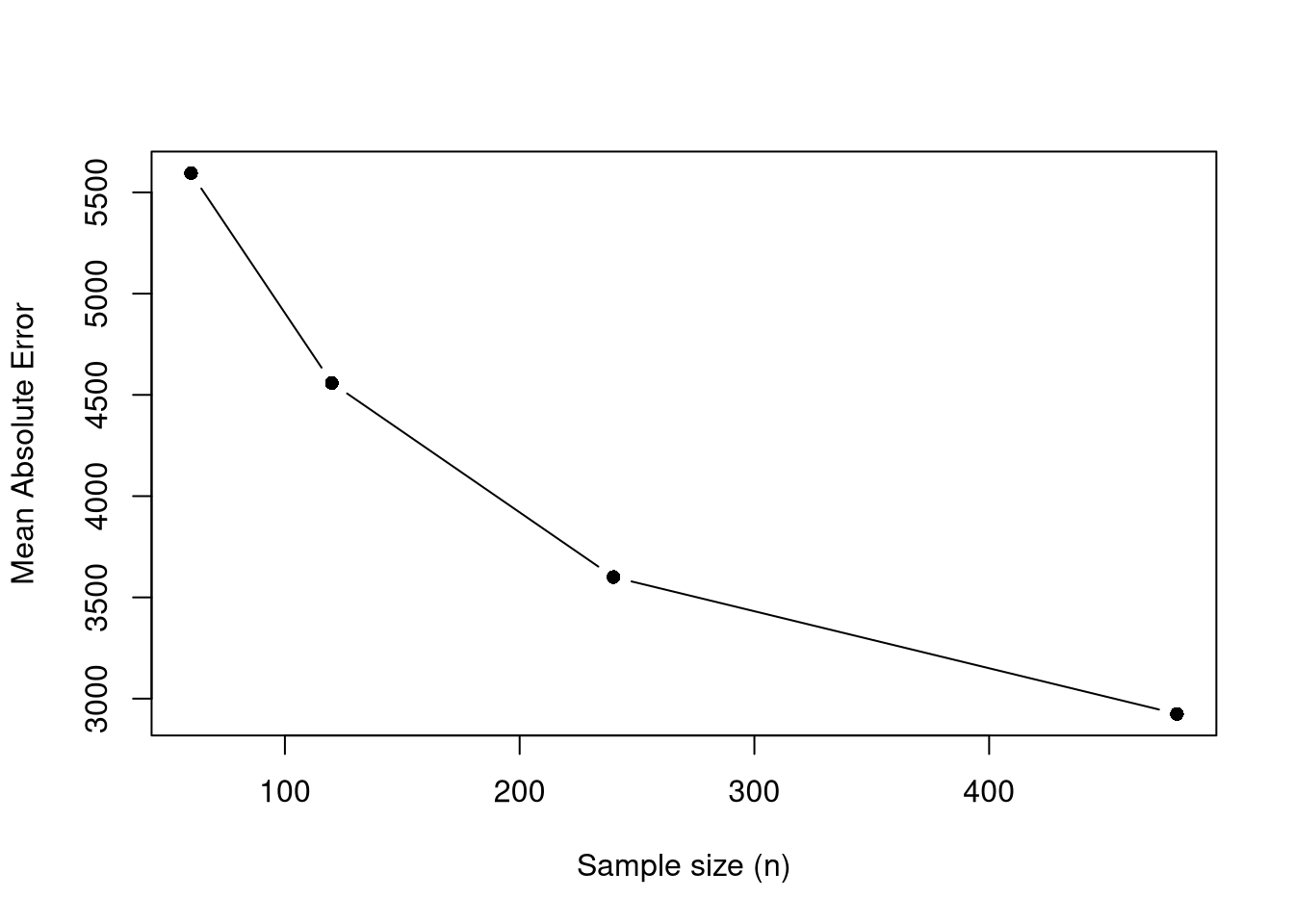
With a continuous \(\hat{x}\), the span can follow the rule \(h_{n}=n^{-1/5}\) directly, without the factor \(2\). Here yearly productivity depends on age through a smooth true mean, and we check the error at age \(40\).
Code
# True mean productivity at each age
true_m <- function(x) (1E-10*exp(1.4*x - .015*x^2)*x + 5E5) / 10

# Simulate n workers with ages evenly spaced from 15 to 70
sim_xy <- function(n){
    x_sim <- seq(15, 70, length.out=n)
    y_sim <- true_m(x_sim) + runif(n, -5E4, 5E4) # true mean plus noise
    return(data.frame(y_sim, x_sim))
}

x_target <- 40  # mid-career age
n_grid <- c(60, 120, 240, 480)
n_rep <- 120

avg_abs_err <- numeric(length(n_grid))
for (ni in seq_along(n_grid)) {
    n <- n_grid[ni]
    span_n <- min(0.9, n^(-1/5)) # shrinks with n
    errs <- replicate(n_rep, {
        xy_sim <- sim_xy(n)
        fit <- loess(y_sim ~ x_sim, data=xy_sim, span=span_n, degree=1)
        y_fit <- predict(fit, newdata=data.frame(x_sim=x_target))
        abs(y_fit - true_m(x_target))
    })
    avg_abs_err[ni] <- mean(errs, na.rm=TRUE)
}

plot(n_grid, avg_abs_err, type='b', pch=16,
    xlab='Sample size (n)',
    ylab='Mean Absolute Error',
    main=NA)
A similar result holds for OLS when the true relationship is linear. Even with unlimited data, however, a misspecified model cannot recover the true conditional mean, as the linear fit to the wage population shows.